RAG & MCP Fundamentals
Two halves to this one. Part 1 (RAG) is about getting the right knowledge in front of a model. Part 2 (MCP) is about letting a model take action through tools in a standardized way. They solve different problems and are often used together: RAG feeds facts in, MCP lets the model do something with them.
Part 1: Retrieval-Augmented Generation (RAG)
The core idea
RAG lets an LLM answer questions using external, dynamic data instead of only what it learned during training. Classic example: an internal company-policy chatbot. The model doesn't "know" your PTO policy - so at query time, the system retrieves the relevant policy text and stuffs it into the prompt before generating an answer.
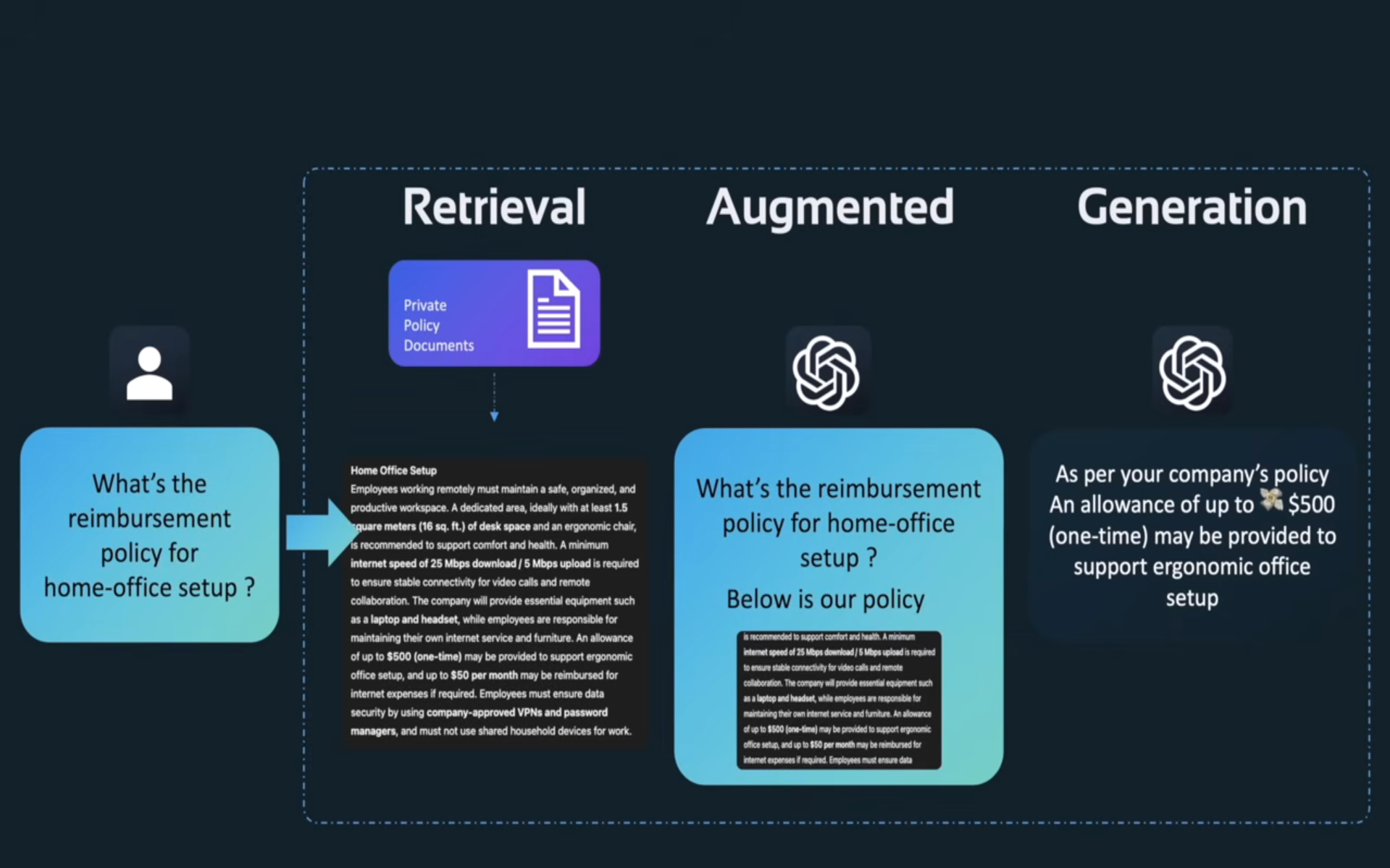
Three steps, hence the name:
- Retrieval - find the document chunk(s) relevant to the query.
- Augmentation - insert that chunk into the prompt as context.
- Generation - let the LLM answer using that context (and ideally cite it).
RAG vs. fine-tuning vs. prompt engineering
- Prompt engineering - cheapest, fastest, but limited to what fits in a single prompt and what the model already knows.
- Fine-tuning - best for teaching a model a static voice or style (tone, format habits). Bad fit for facts that change often, since you'd have to retrain every time the underlying data changes.
- RAG - best for dynamic, factual information. The knowledge lives outside the model and gets refreshed independently of it - update the source documents, not the weights.
Step 1: figuring out what to retrieve
Feeding a model every document is wasteful and often literally won't fit in context. So the first problem RAG solves is: given a query, which document(s) actually matter?
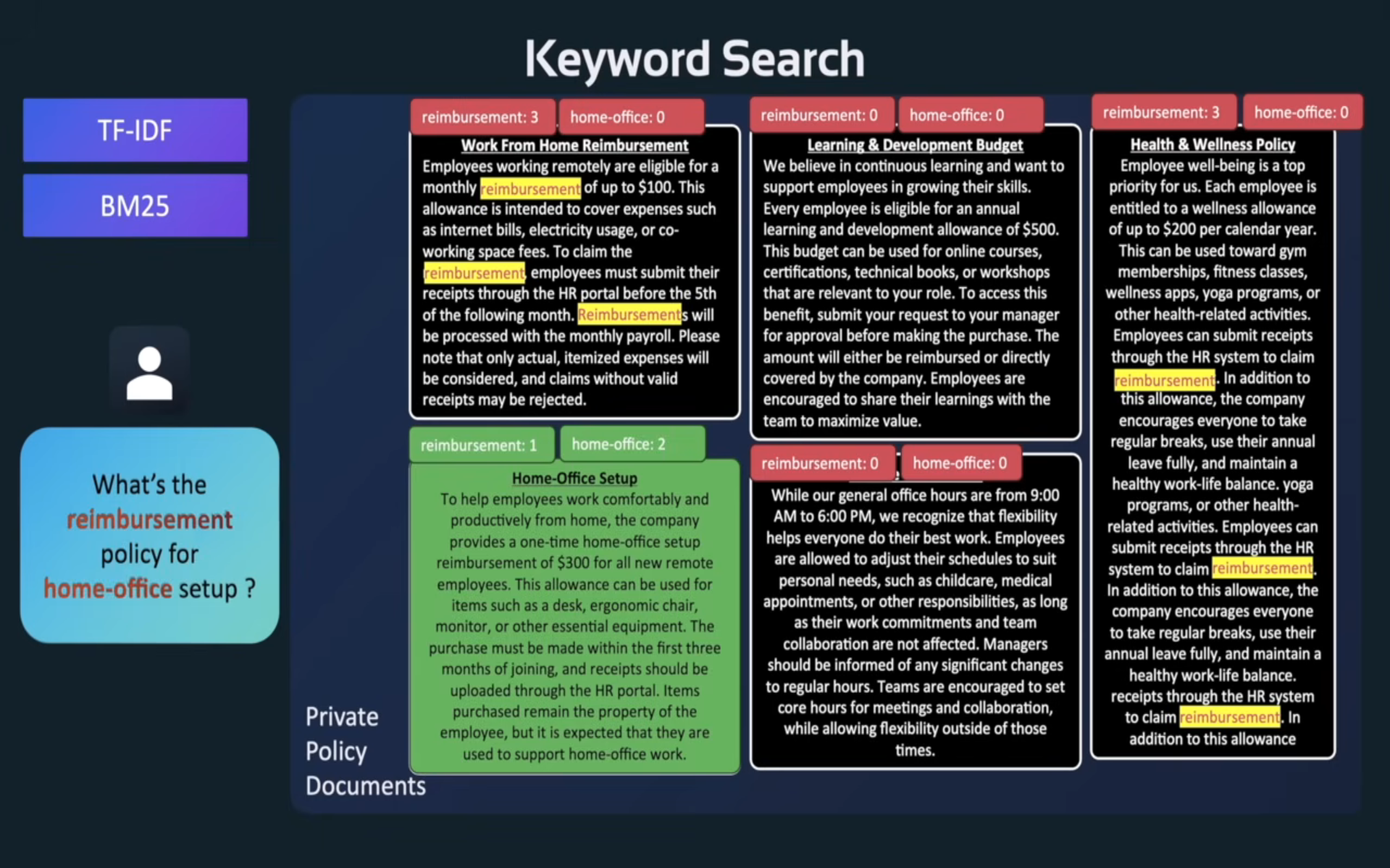
Keyword search (TF-IDF / BM25) - the traditional approach. Score documents by how many query keywords they contain (weighted by how rare/important those words are). Fast and cheap, but brittle: it has no notion of meaning, so a query for "reimbursement" won't match a document that only says "allowance."
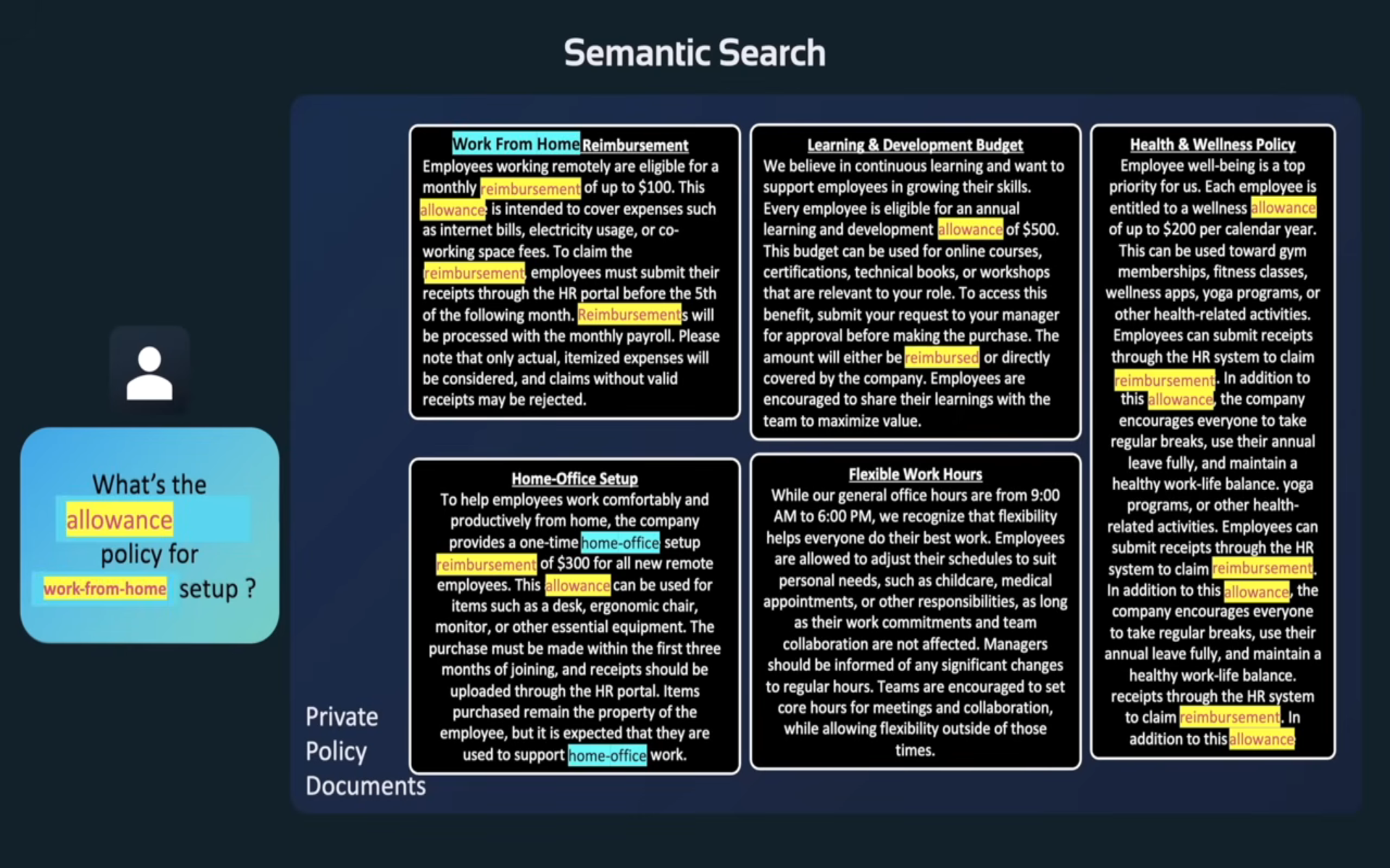
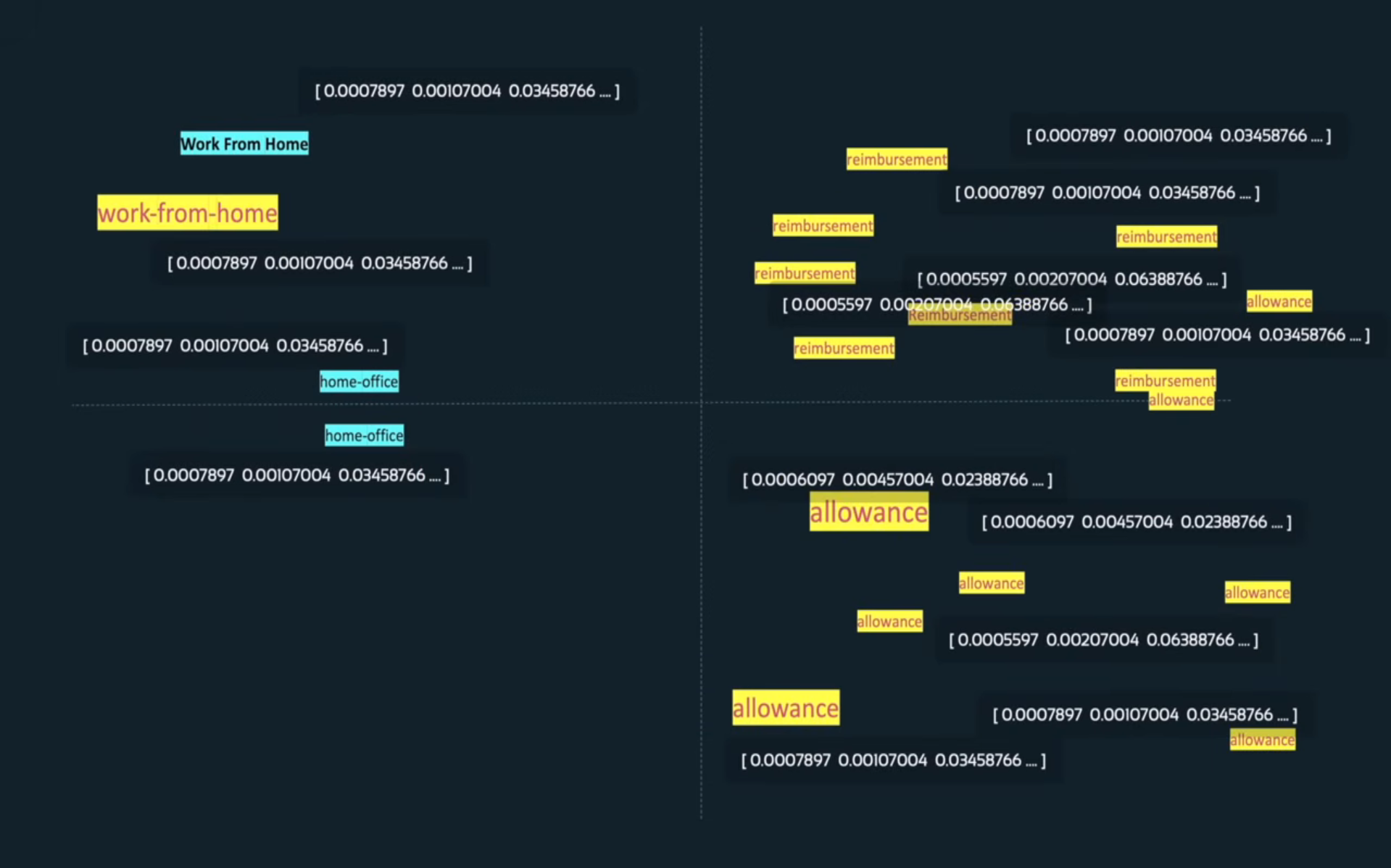
Semantic search - moves past exact wording by using embeddings: a model maps text into a high-dimensional vector space where meaning determines position, not spelling. "Allowance" and "reimbursement" end up near each other even though they share no keywords.
Embedding models vary in size (parameter count) and where they run - locally (open weights) vs. via an API. Parameters, loosely, are the number of learned values the model uses to distinguish and represent data; bigger isn't automatically better for embeddings the way it can be for generation, since embedding quality is more about training data and objective than raw size.
Once text is embedded, "how similar are these two things" becomes a math problem - typically the dot product (or cosine similarity) between two vectors. Closer vectors = more similar meaning.
Step 2: storing embeddings efficiently - vector databases
Searching raw documents every query is inefficient, and re-embedding every document on every query is also inefficient. The fix: embed documents once, store the vectors in a vector database (Chroma, Pinecone, etc.), and query against that store instead.
Vector DBs use approximate-nearest-neighbor indexing algorithms to make similarity search fast at scale, since brute-force comparing a query vector against millions of stored vectors doesn't scale:
- HNSW (Hierarchical Navigable Small World) - graph-based, very common default, good speed/accuracy tradeoff.
- IVF (Inverted File Index) - clusters vectors first, then only searches the most relevant clusters.
- LSH (Locality-Sensitive Hashing) - hashes similar vectors into the same buckets.
Step 3: chunking strategy
Feeding an entire document as one chunk is imprecise (too much irrelevant text dilutes the relevant part); feeding one word at a time destroys context. Chunking is the balance between the two.
Common approaches:
- Fixed-size chunking with overlap - split every N tokens/characters, with some overlap between consecutive chunks so a fact that spans a chunk boundary isn't lost entirely.
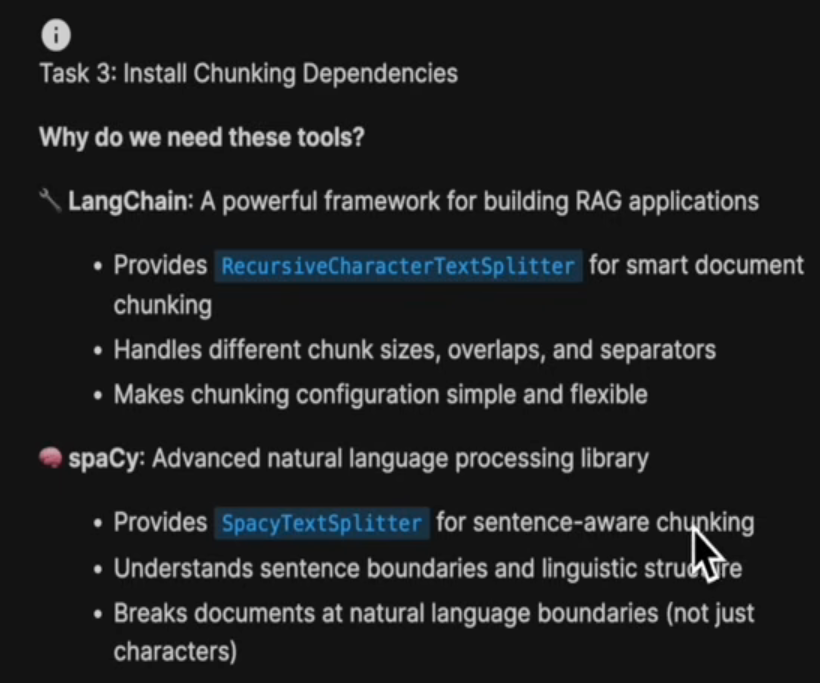
- Boundary-aware / sentence-aware chunking - split on natural boundaries (sentences, paragraphs) instead of a raw character count, using something like spaCy's
SpacyTextSplitterso chunks don't cut mid-sentence. - LangChain's
RecursiveCharacterTextSplitter- tries a list of separators (paragraph, then sentence, then word) in order, falling back only when needed, to keep chunks as semantically coherent as possible while still respecting a size limit.
Putting the pipeline together
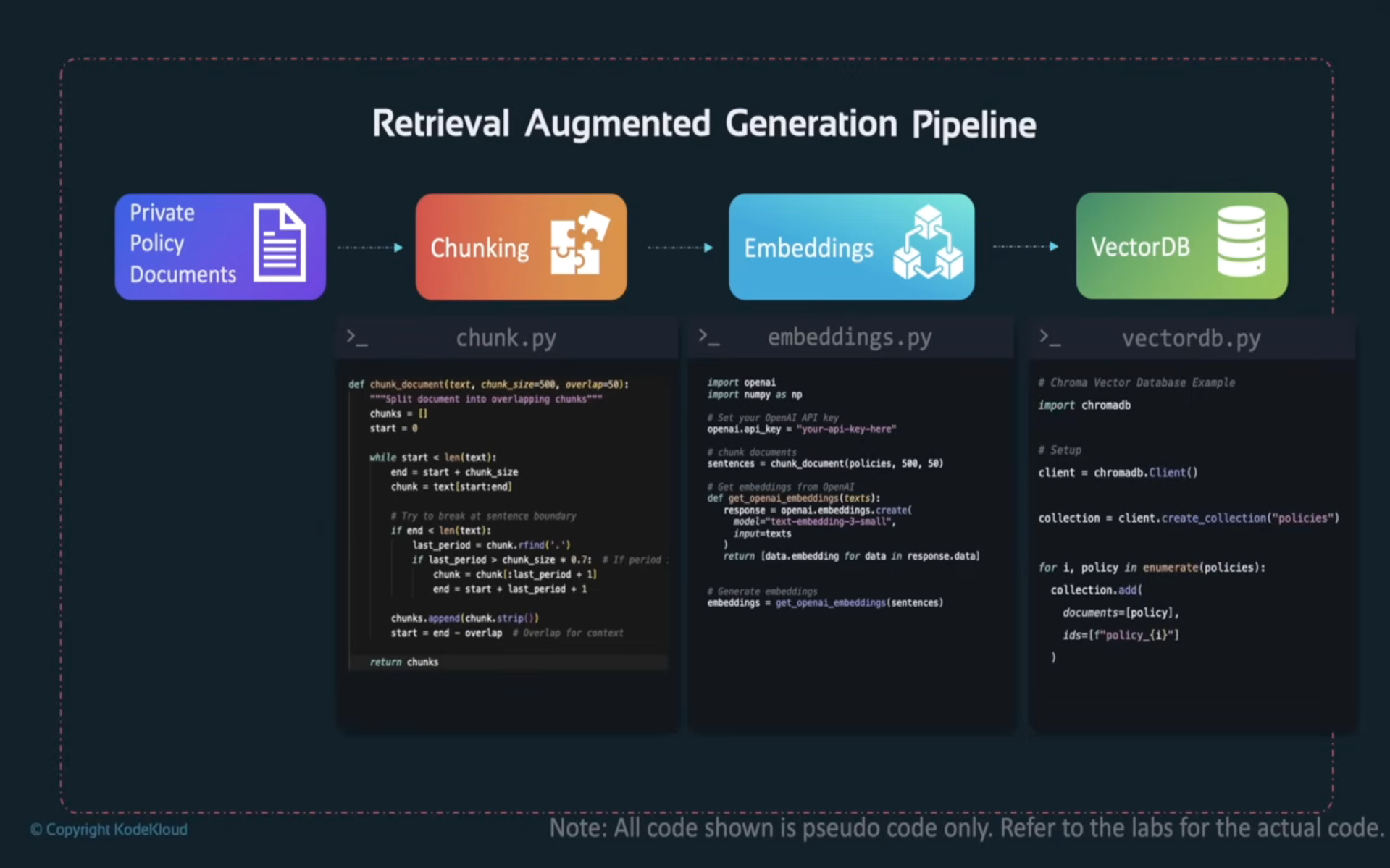
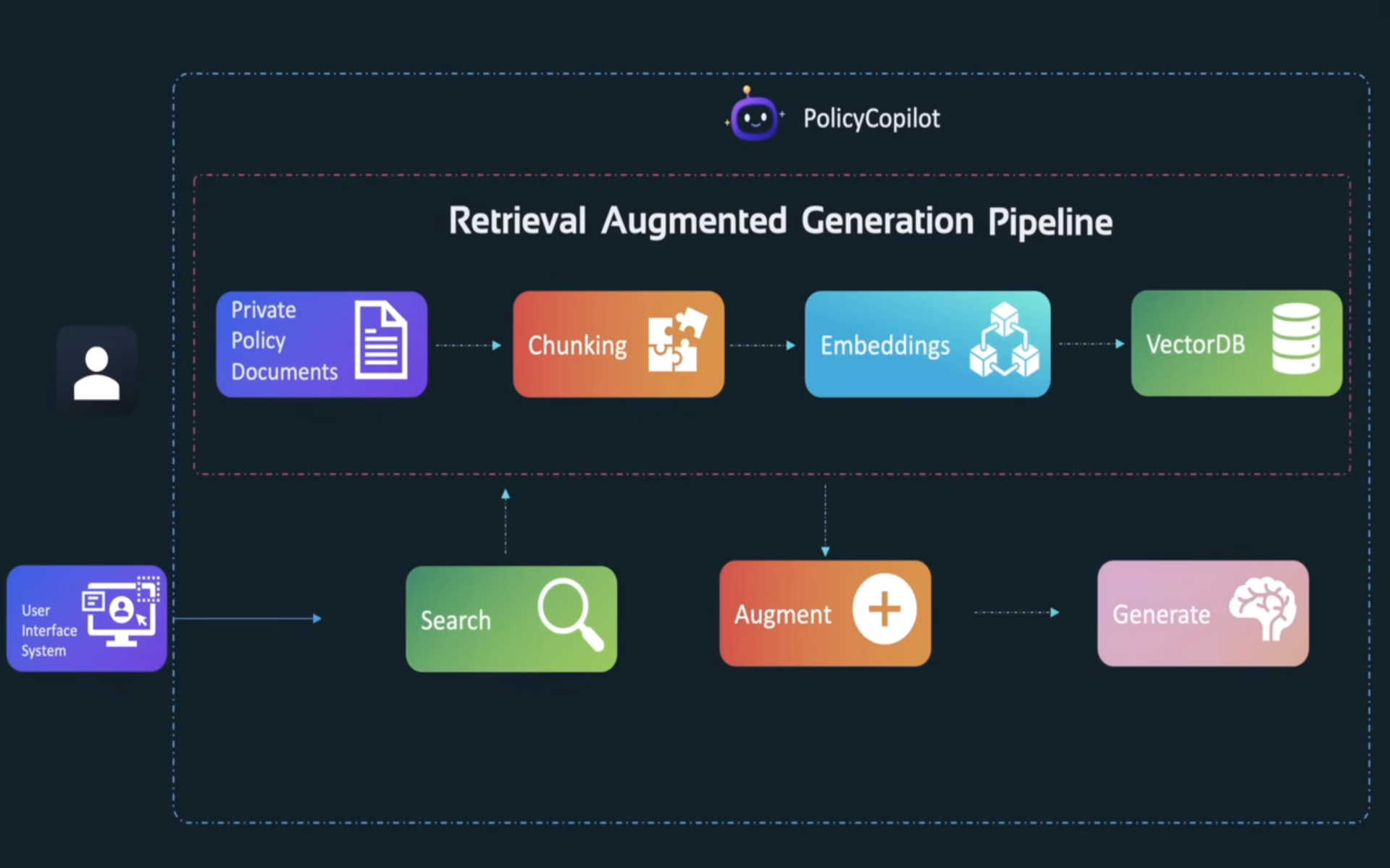
Ingestion side: documents get chunked, embedded, and written into the vector DB. Query side: the user's question triggers the same embedding step, a similarity search against the vector DB, and then augmentation + generation.
Production concerns
A working demo and a production RAG system are different beasts. Things that matter once real traffic shows up:
-
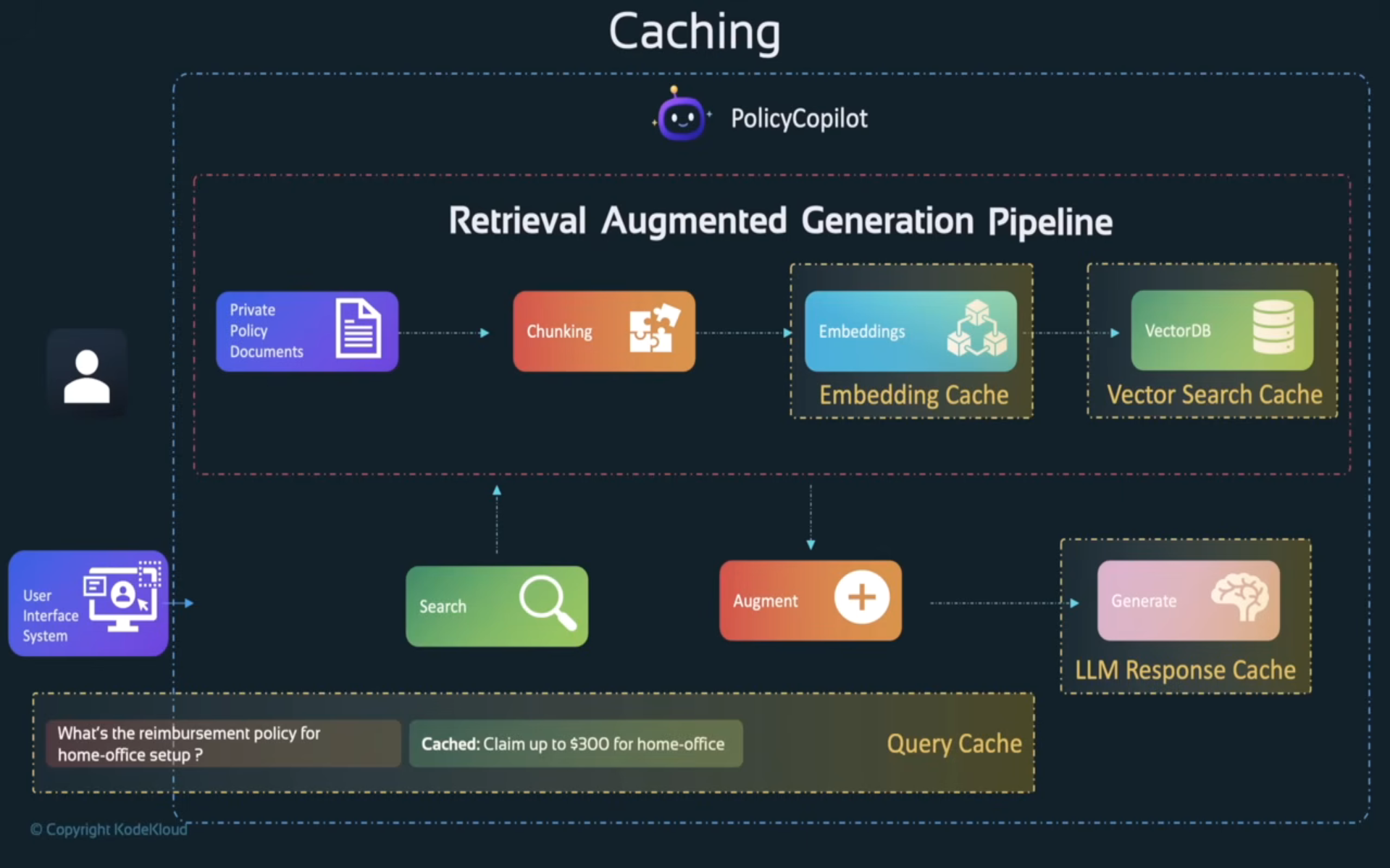
Caching - avoid redundant work at every layer: an embedding cache (don't re-embed identical text), a vector search cache (cache results for repeated/similar queries), an LLM response cache (skip generation entirely for a repeated question), and a query cache (e.g. Redis) sitting in front of the whole pipeline.
-
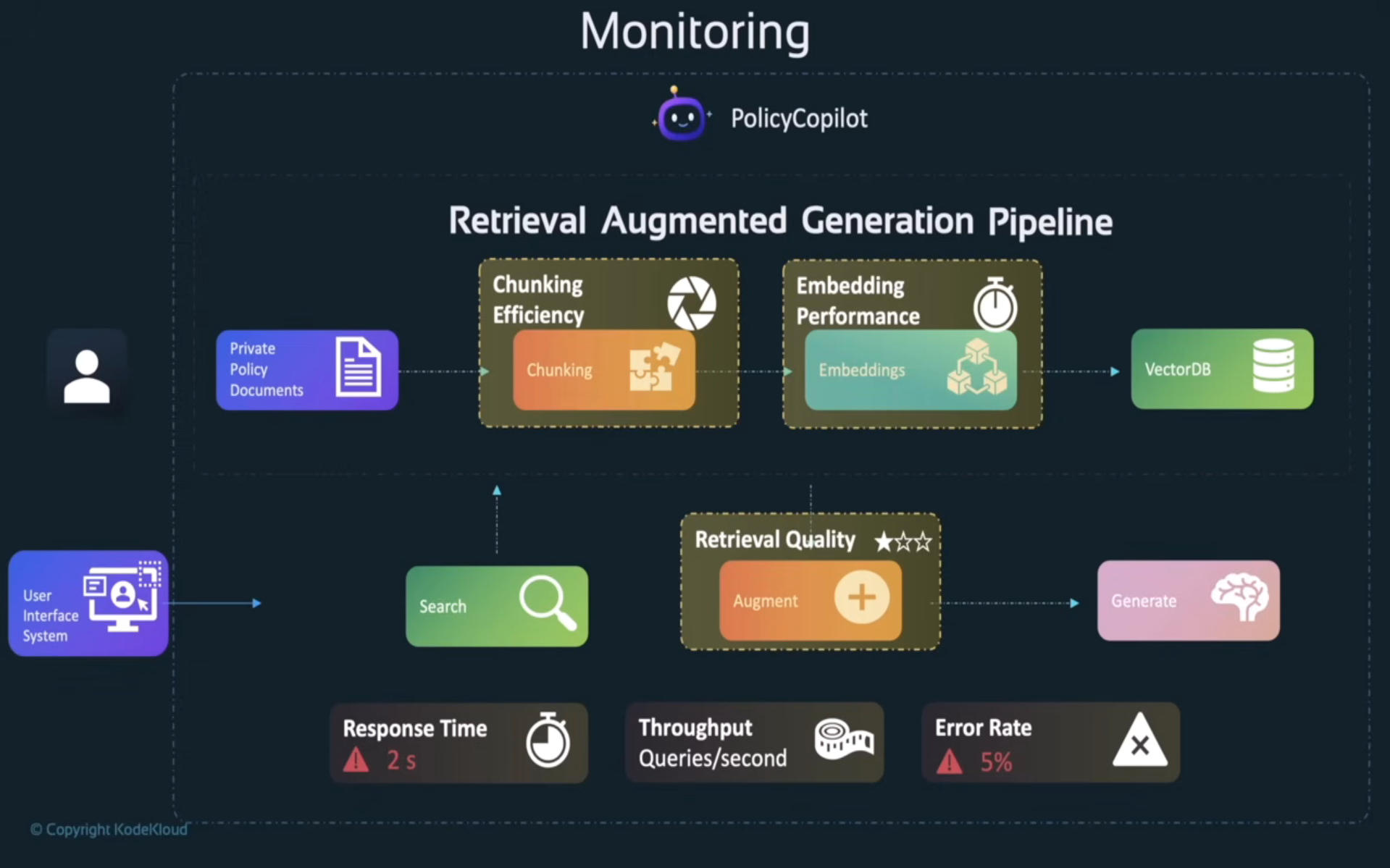
Monitoring - track chunking efficiency, embedding performance, retrieval quality, response time, throughput, and error rate. "Retrieval quality" in particular is easy to skip and is usually the first thing that silently degrades as a document set grows.
-
Graceful failure / error handling - each stage (vector DB, embedding call, LLM call) can fail independently, so wrap them and fall back to a user-friendly message instead of a raw stack trace.
def get_policy_answer(query: str) -> str:try:chunks = vector_db.search(embed(query))return llm.generate(query, context=chunks)except VectorDBError:return "I couldn't search the policy database right now - please try again shortly."except EmbeddingError:return "I couldn't process that question - please rephrase and try again."except LLMError:return "I found relevant info but couldn't generate a response - please try again."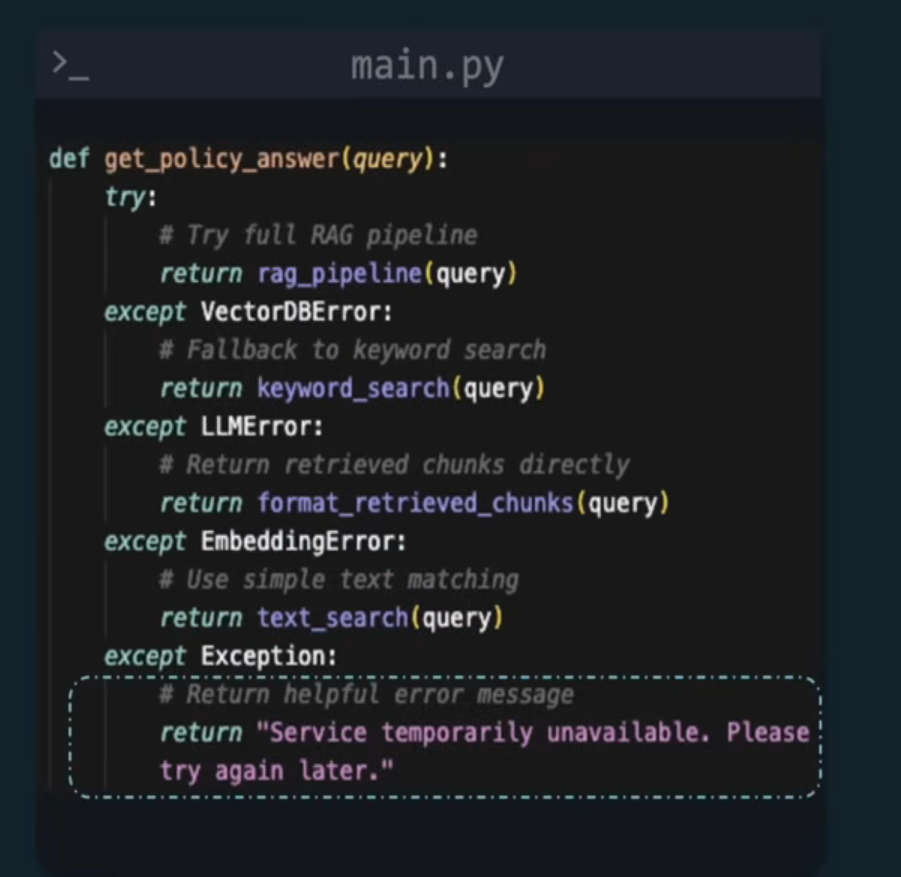
-
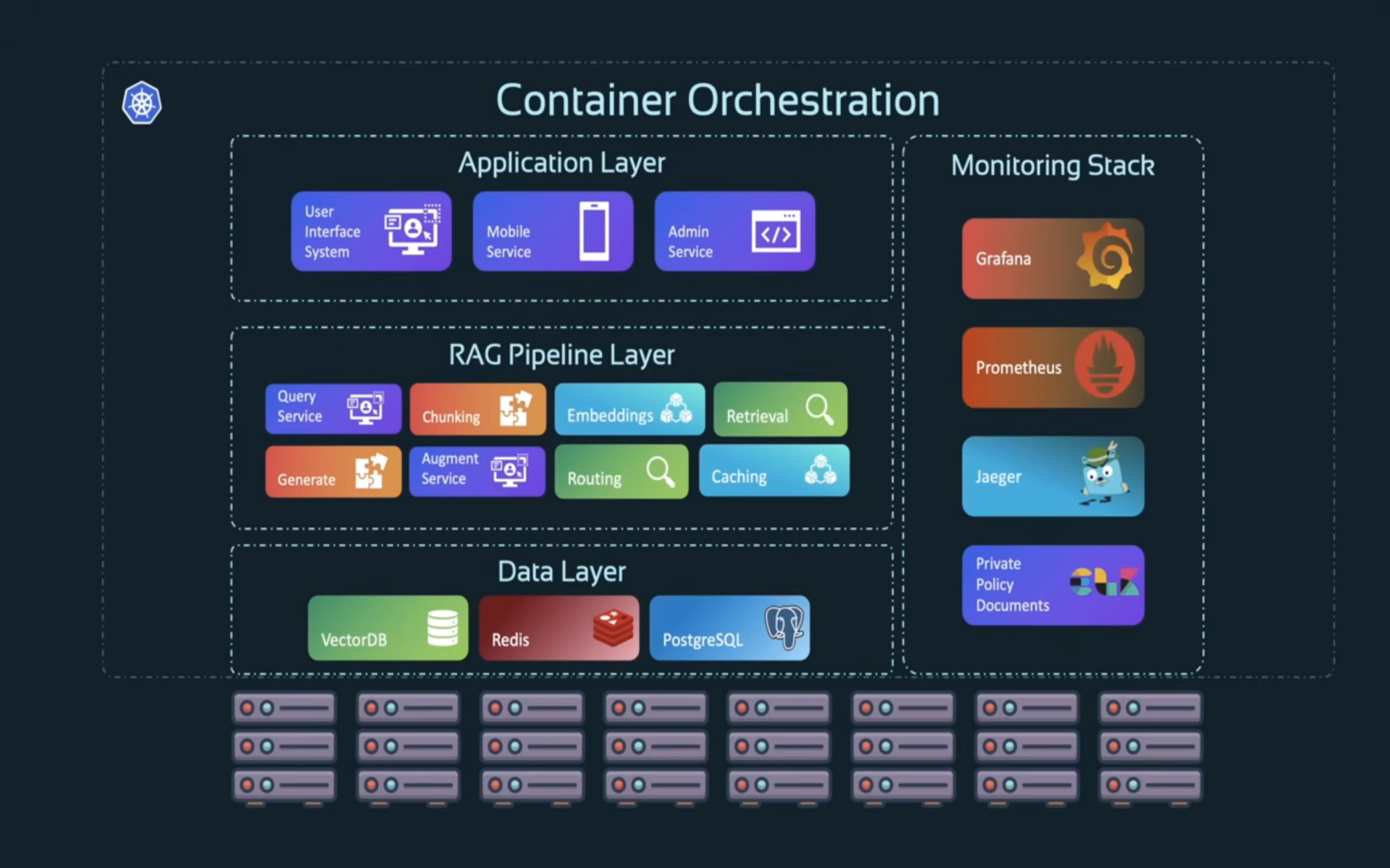
Production architecture - in practice this tends to land as microservices on Kubernetes: an application layer, the RAG pipeline itself, a data layer (vector DB + document store), and a monitoring stack running alongside all of it.
LangChain: the framework that implements a lot of this
LangChain is a framework for building the RAG pipeline itself - document loaders, text splitters (RecursiveCharacterTextSplitter and friends), embedding-model wrappers, vector-store integrations (Chroma, Pinecone, etc.), and "chains" that wire retrieval and generation together into one call. It's not a competitor to MCP - it's a toolkit for the retrieval half of a system, whereas MCP (next section) standardizes how an agent talks to tools and data sources at runtime. A LangChain-built retriever can happily be exposed to an agent as an MCP Resource or Tool.
Part 2: Model Context Protocol (MCP)
Why MCP exists
RAG gets facts to a model. But agents also need to act - book a flight, send an email, query a live API. Say an agent needs to book a flight: it has to check ticket info against the user's stated preferences and choose between several airline tools.
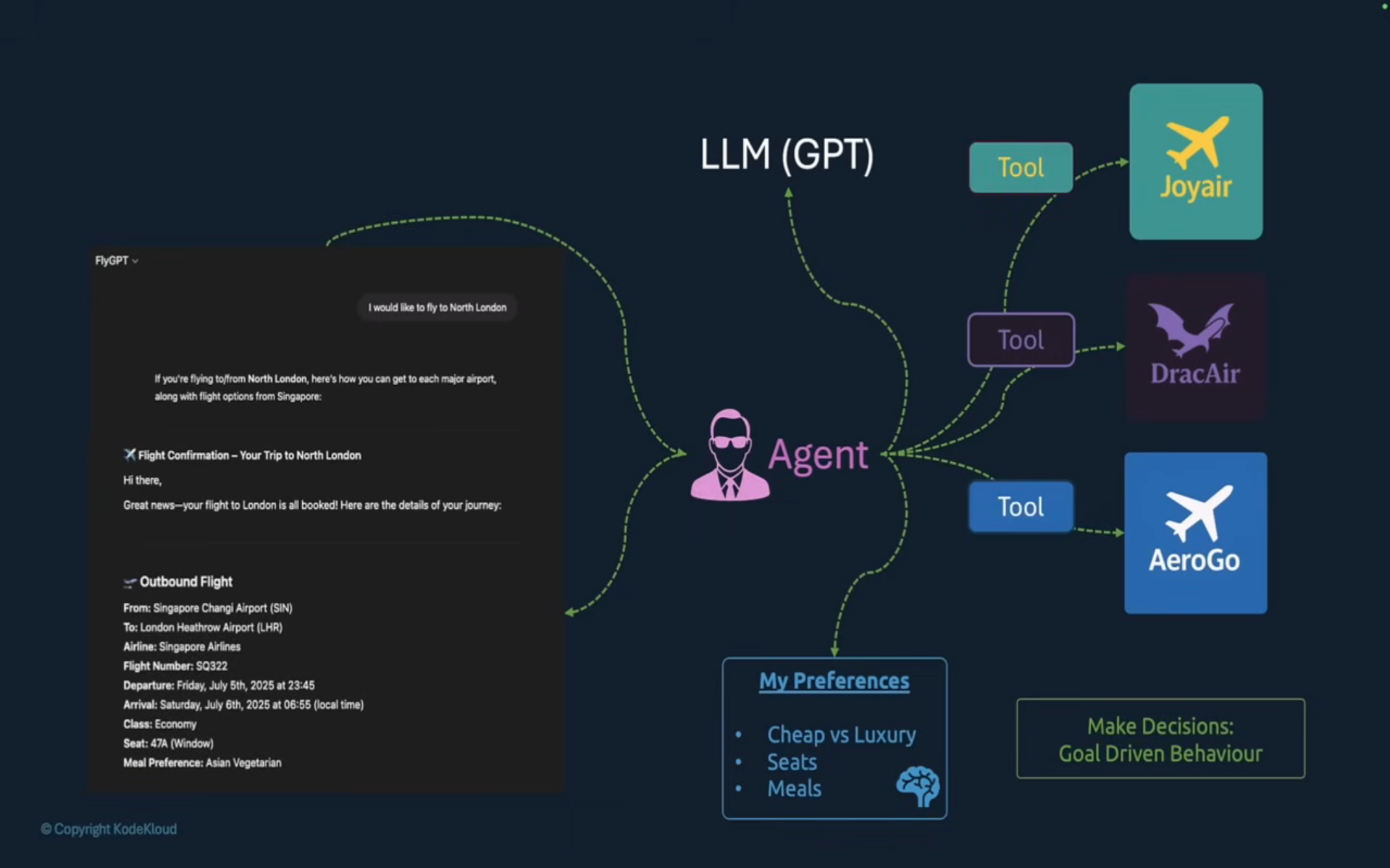
The naive way to wire this up is to hand-write a function per API (def call_tool(...) per airline), with all the auth, schema, and error-handling differences baked in separately for each one. That doesn't scale past a handful of integrations.
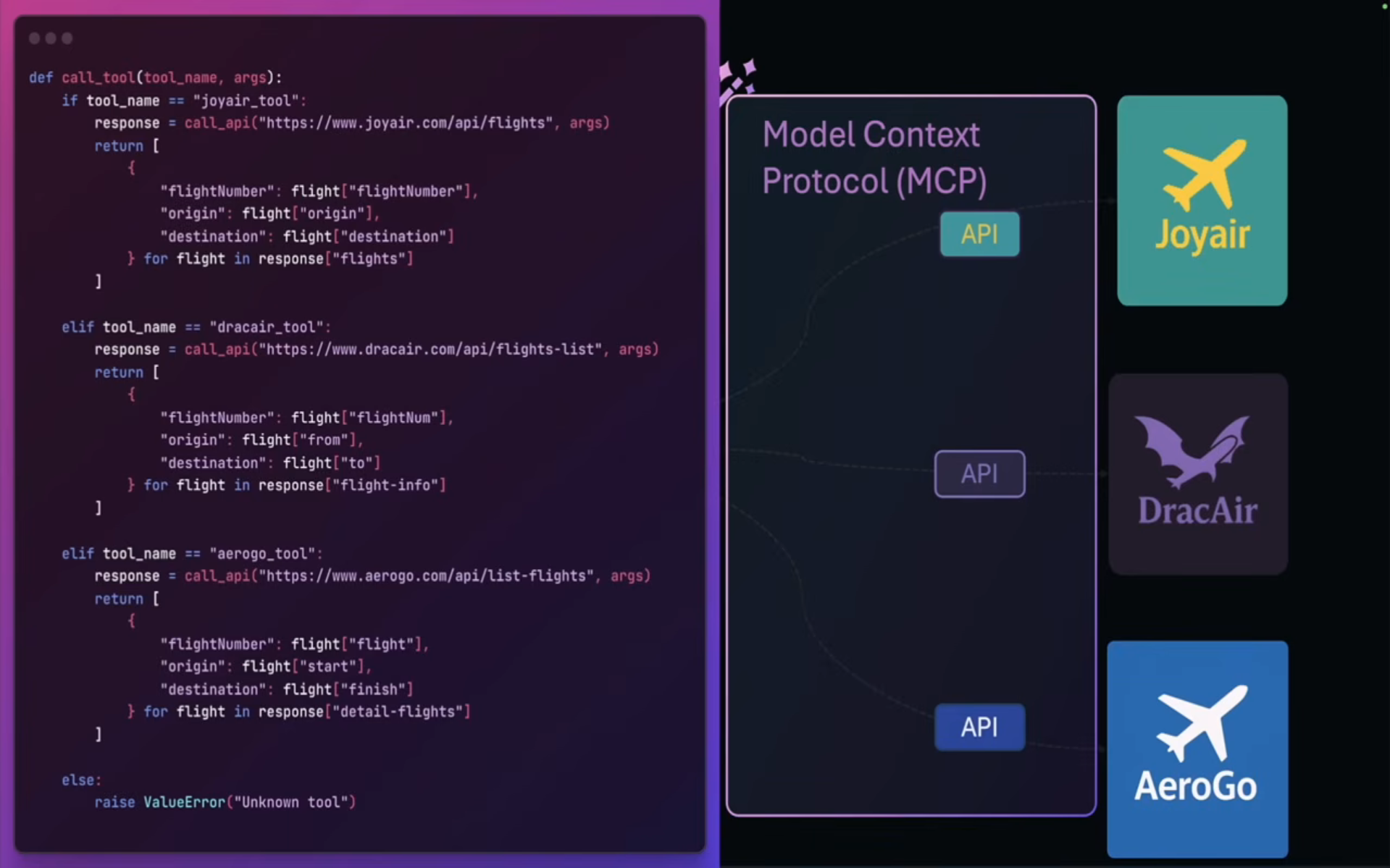
MCP is the standardized boundary that replaces that: the agent talks to one consistent client interface, and any MCP-compliant server - regardless of what it wraps underneath - looks the same from the agent's side.
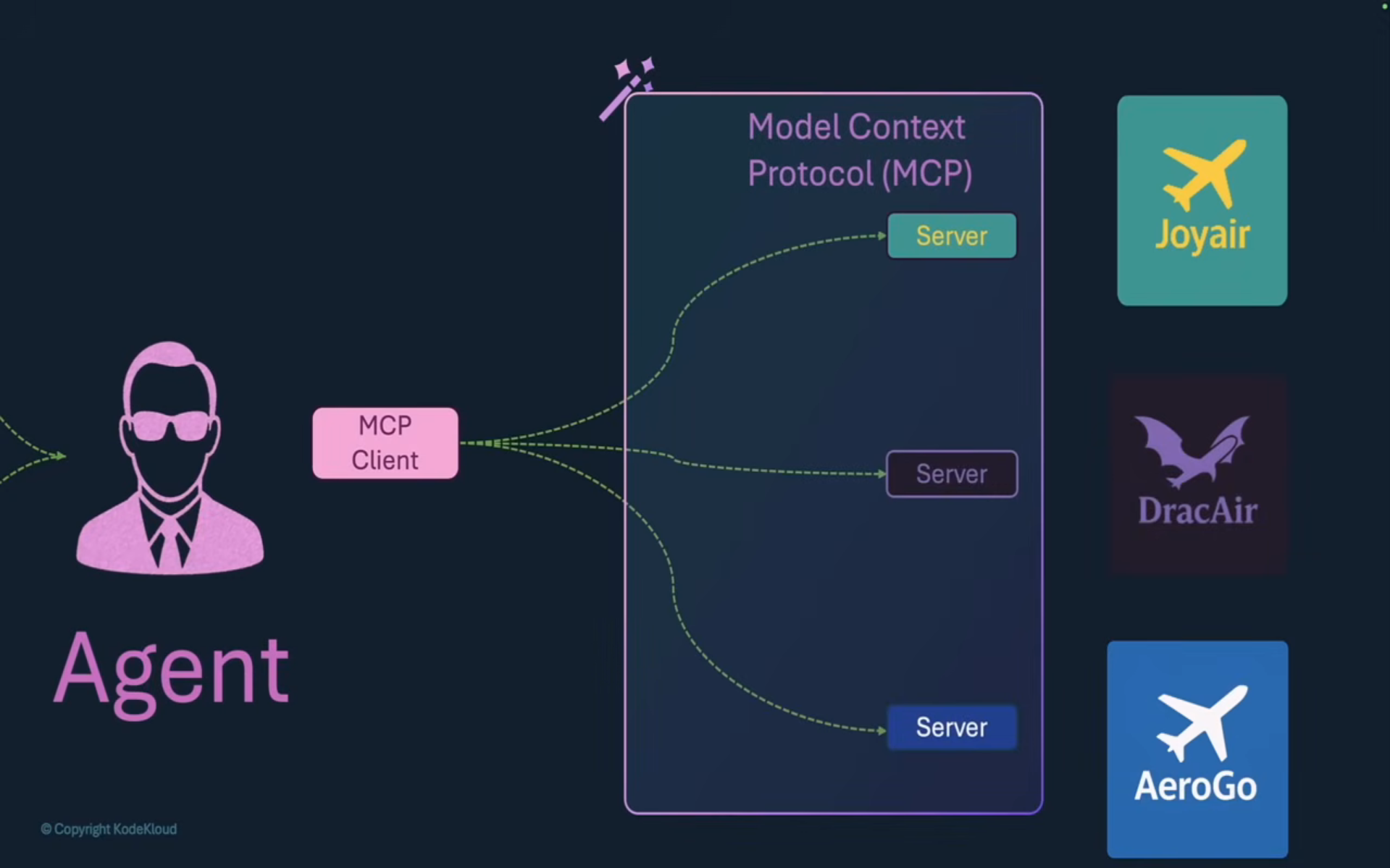
Core MCP entities
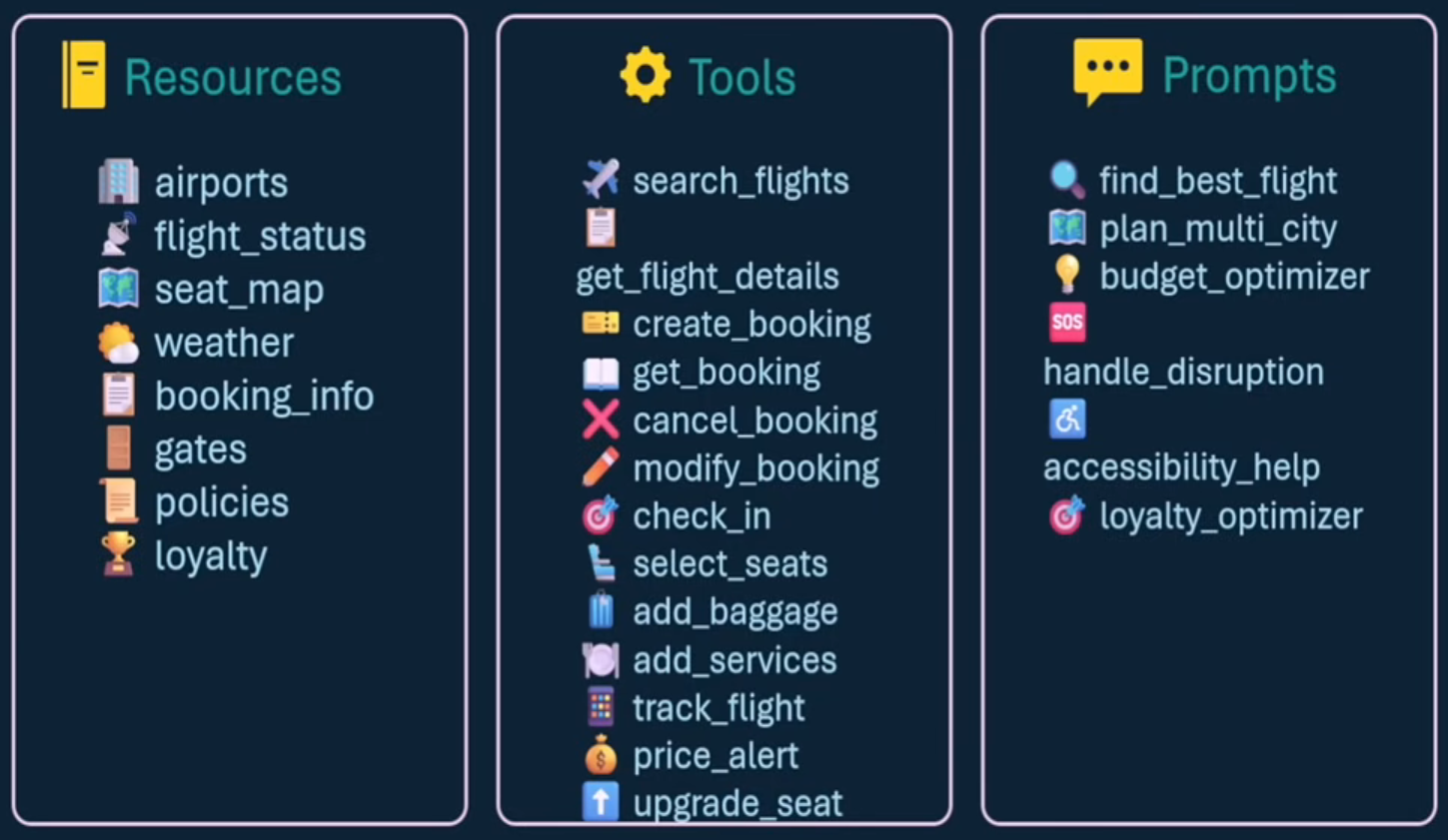
- Tools - capabilities exposed by a server (functions/APIs the model can invoke). Typically model-invoked - the LLM decides to call
search_flights. - Resources - data access (files, URLs, any read-only context). Typically client-invoked - the client decides what context to attach.
- Prompts - pre-defined instruction templates a user can trigger on demand (e.g. a "budget optimizer" prompt). Typically user-invoked.
A travel assistant is a good worked example because it needs all three at once:
Transport: JSON-RPC 2.0 over stdio or HTTP
MCP doesn't invent its own wire format - every request/response is a JSON-RPC 2.0 message (method, id, params/result). What MCP standardizes on top is which methods exist (tools/call, resources/read, prompts/get, ...) and how client and server negotiate capabilities when a connection opens.
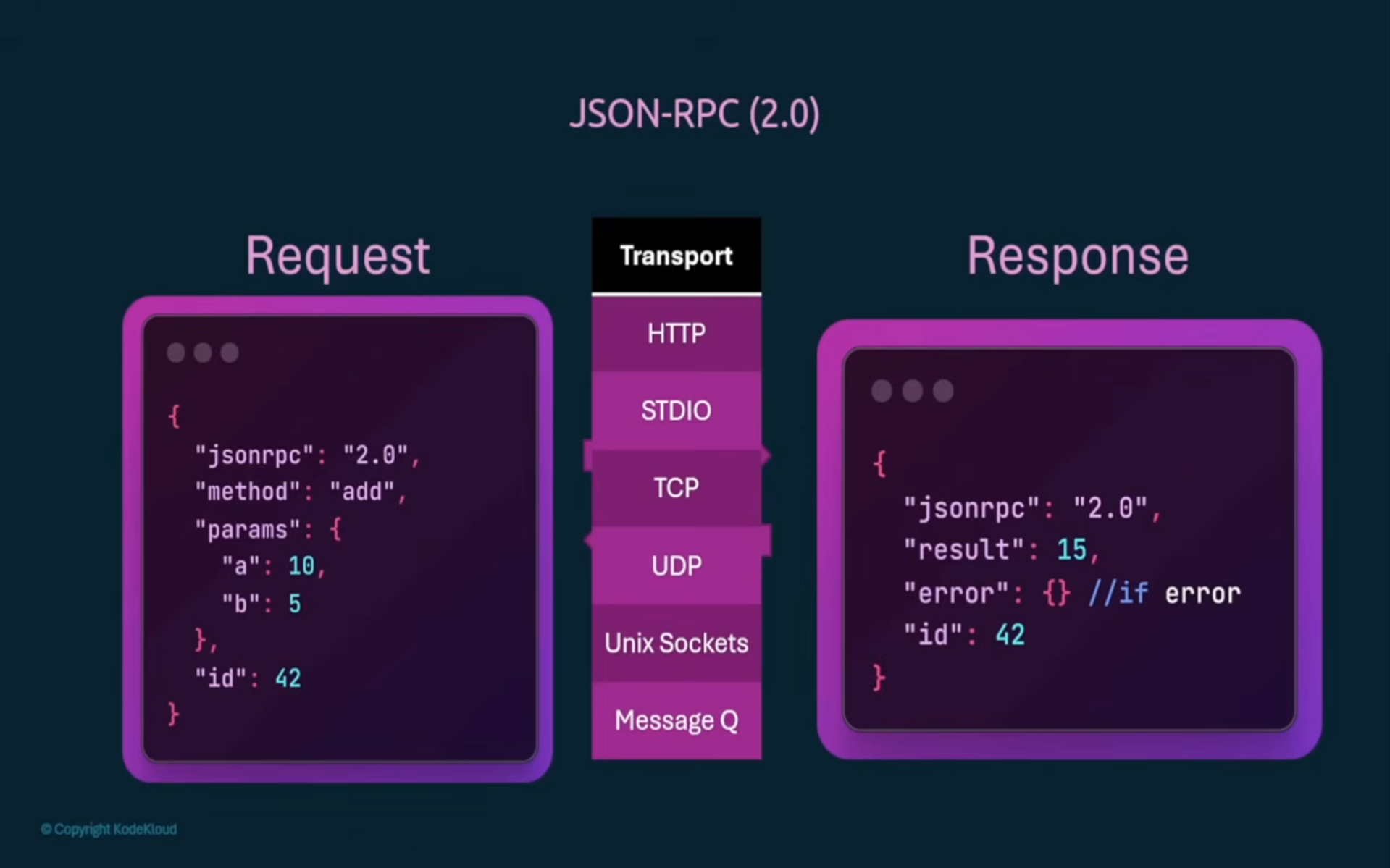
The JSON-RPC message doesn't care how it physically travels - that's the transport's job:
| Transport | How it works | Best for |
|---|---|---|
| stdio | Client spawns the server as a local subprocess, talks over stdin/stdout | Local tools, CLI integrations, desktop apps (e.g. Claude Desktop launching a server binary) |
| HTTP (streamable-http) | Client talks to a long-lived server over HTTP, streamed via Server-Sent Events | Remote servers, multi-client servers, anything living outside the user's machine |
Mental model: stdio = "the server is basically a library the client owns"; HTTP = "the server is a real service other people can also hit." Same JSON-RPC messages either way - only the pipe changes.
Building a server with FastMCP
The Python SDK's FastMCP class is the fast path - decorators turn plain functions into Tools/Resources/Prompts, and the same server object can run over any transport.
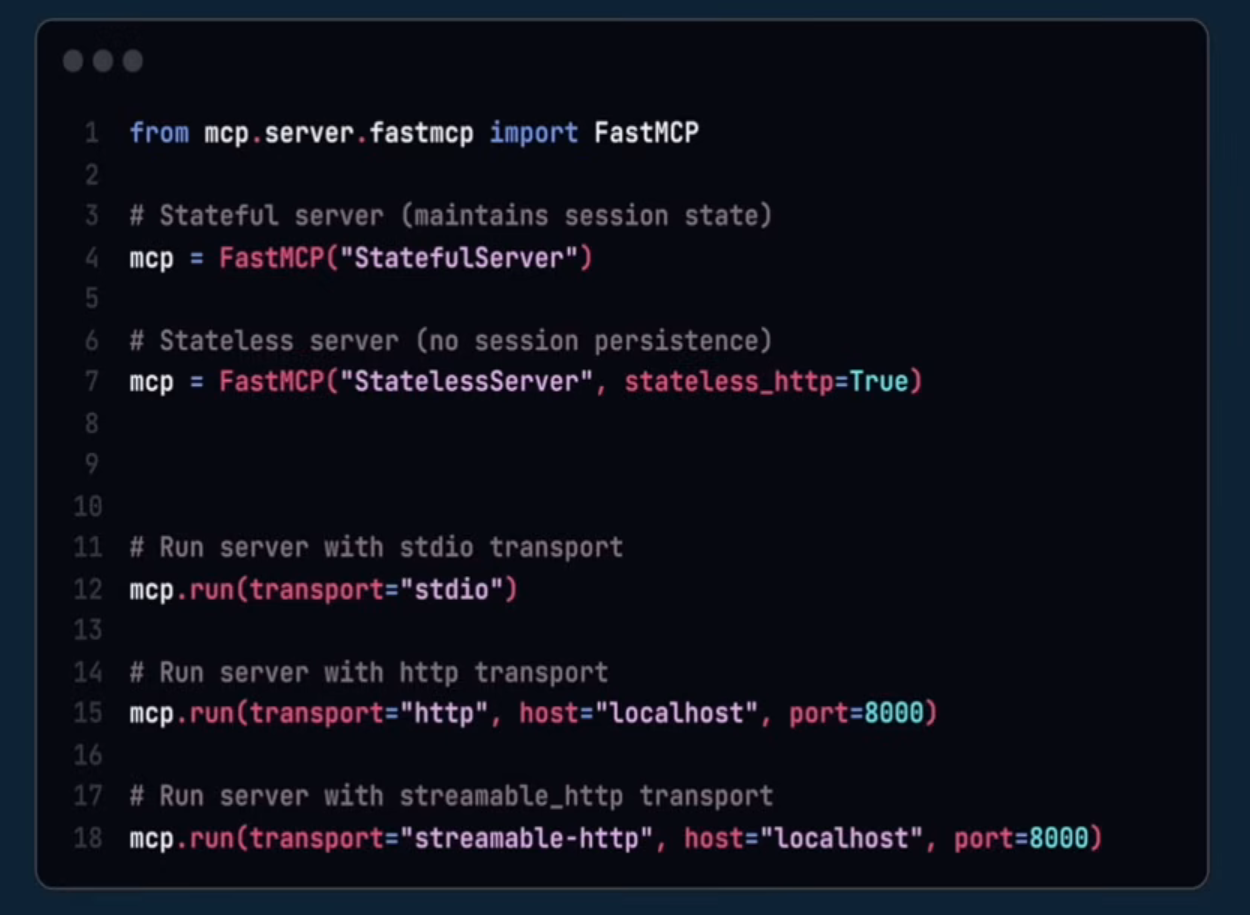
from mcp.server.fastmcp import FastMCP

# stateful=True keeps a session per client connection (needed for
# progress updates, sampling, elicitation - anything that needs to
# talk back to a specific client). stateless is lighter weight but
# can't do those callback-style features.
mcp = FastMCP("travel-assistant", stateful=True)

@mcp.tool()
def search_flights(origin: str, destination: str, date: str) -> list[dict]:
    """Search available flights between two airports on a given date."""
    ...

if __name__ == "__main__":
    mcp.run(transport="stdio")
    # mcp.run(transport="streamable-http", host="0.0.0.0", port=8000)
Stateful vs. stateless is the first real decision, and it's not just a performance knob:
- Stateless - every call is independent; nothing is remembered between requests. Simple to scale horizontally, but the server can't reach back out to the client mid-task.
- Stateful - the server keeps a session tied to the connection. Required for everything below (progress, sampling, elicitation).
Context: progress reporting on long-running tools
Once a server is stateful, tool functions can accept a Context object (conventionally ctx) that gives access to the live session - including the ability to stream progress back to whoever called the tool.
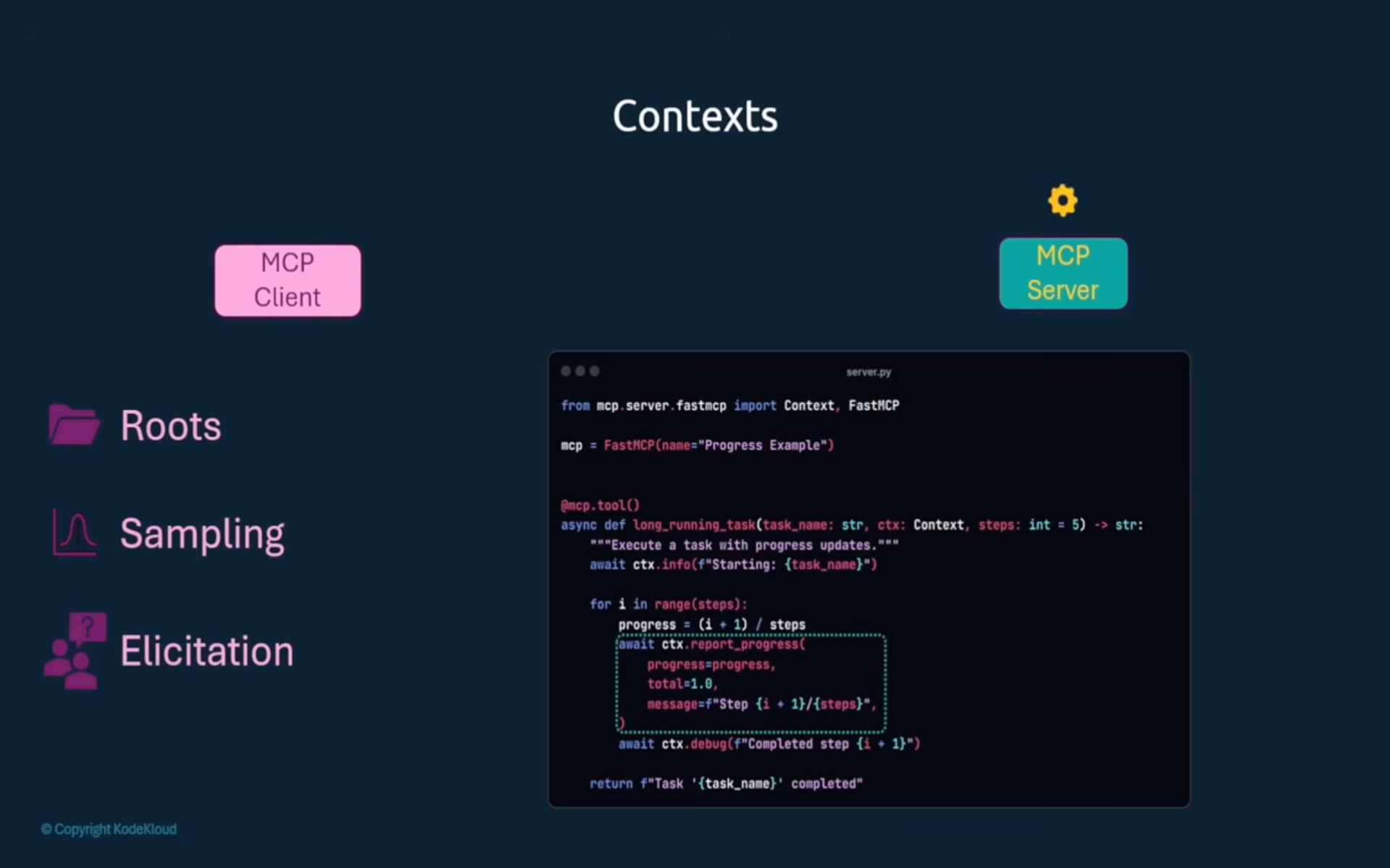
from mcp.server.fastmcp import Context

@mcp.tool()
async def bulk_reindex(paths: list[str], ctx: Context) -> str:
    total = len(paths)
    for i, path in enumerate(paths):
        await reindex_one(path)
        await ctx.report_progress(progress=i + 1, total=total)
    return f"Reindexed {total} files"
Without this, a client has no visibility into a slow tool call beyond "waiting..." With it, a UI can render an actual progress bar driven by the server.
Roots: letting the server ask "what am I allowed to touch?"
Roots flip the usual direction of information: instead of the client handing the server data, the server asks the client which local paths it's allowed to operate on. Filesystem access stays under the client's control instead of hardcoded into the server.
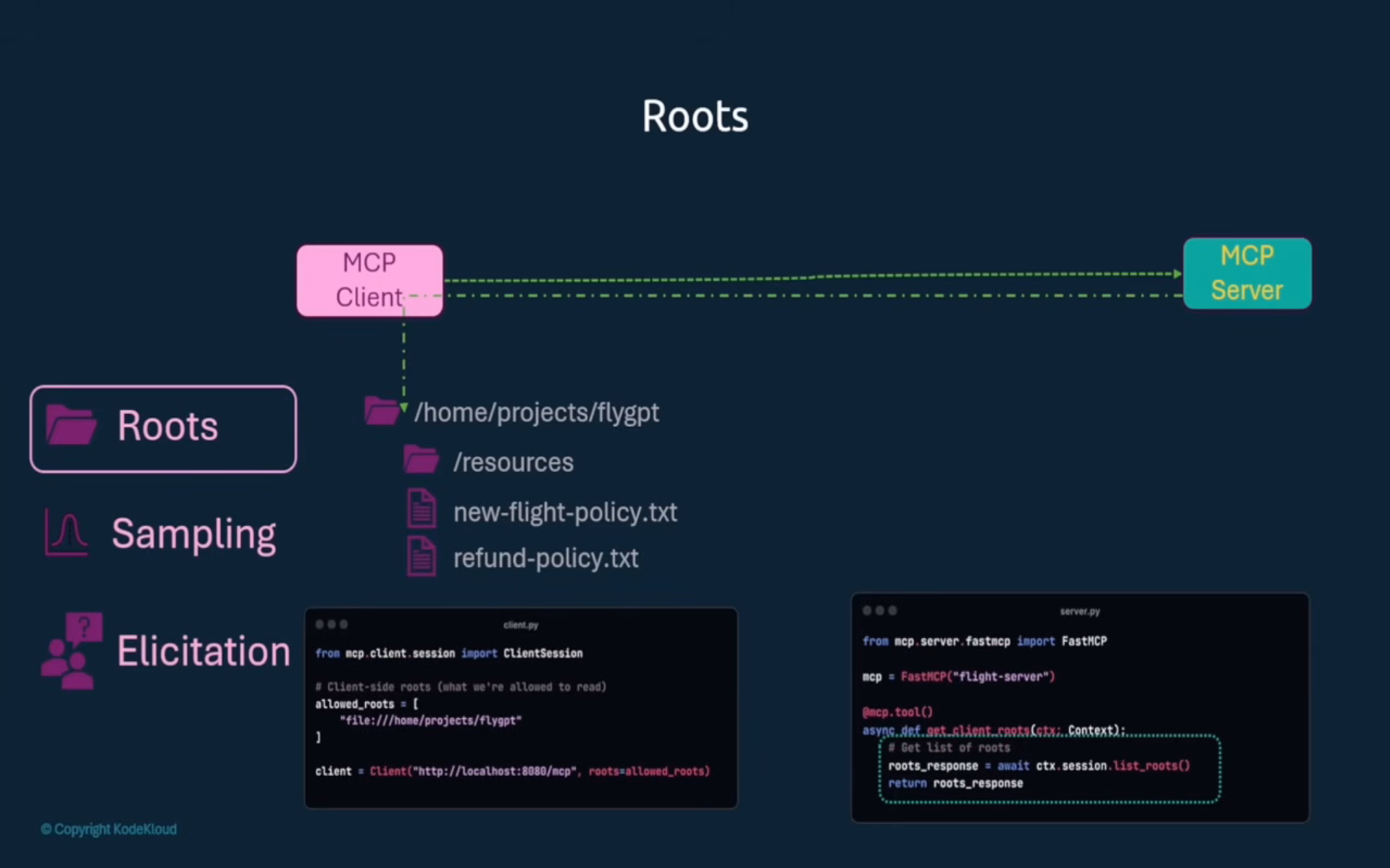
# client.py - the client decides (often from user config) which
# directories the server is even allowed to know about
session = await client.connect(
    server,
    roots=["file:///Users/me/projects/policy-docs"],
)
# server.py - the server never hardcodes a path; it asks
@mcp.tool()
async def list_policy_files(ctx: Context) -> list[str]:
    roots = await ctx.session.list_roots()
    return [str(r.uri) for r in roots]
Same instinct as OS-level sandboxing: the tool declares what it wants to do, and the environment (the client) decides what it's actually allowed to see.
Sampling: servers don't get to call the LLM directly
Subtle but important MCP design choice: an MCP server has no direct line to an LLM. If a tool needs a model completion mid-execution (e.g. to summarize something before returning it), it can't just call an API key it happens to have - it routes the request back through the client via sampling.
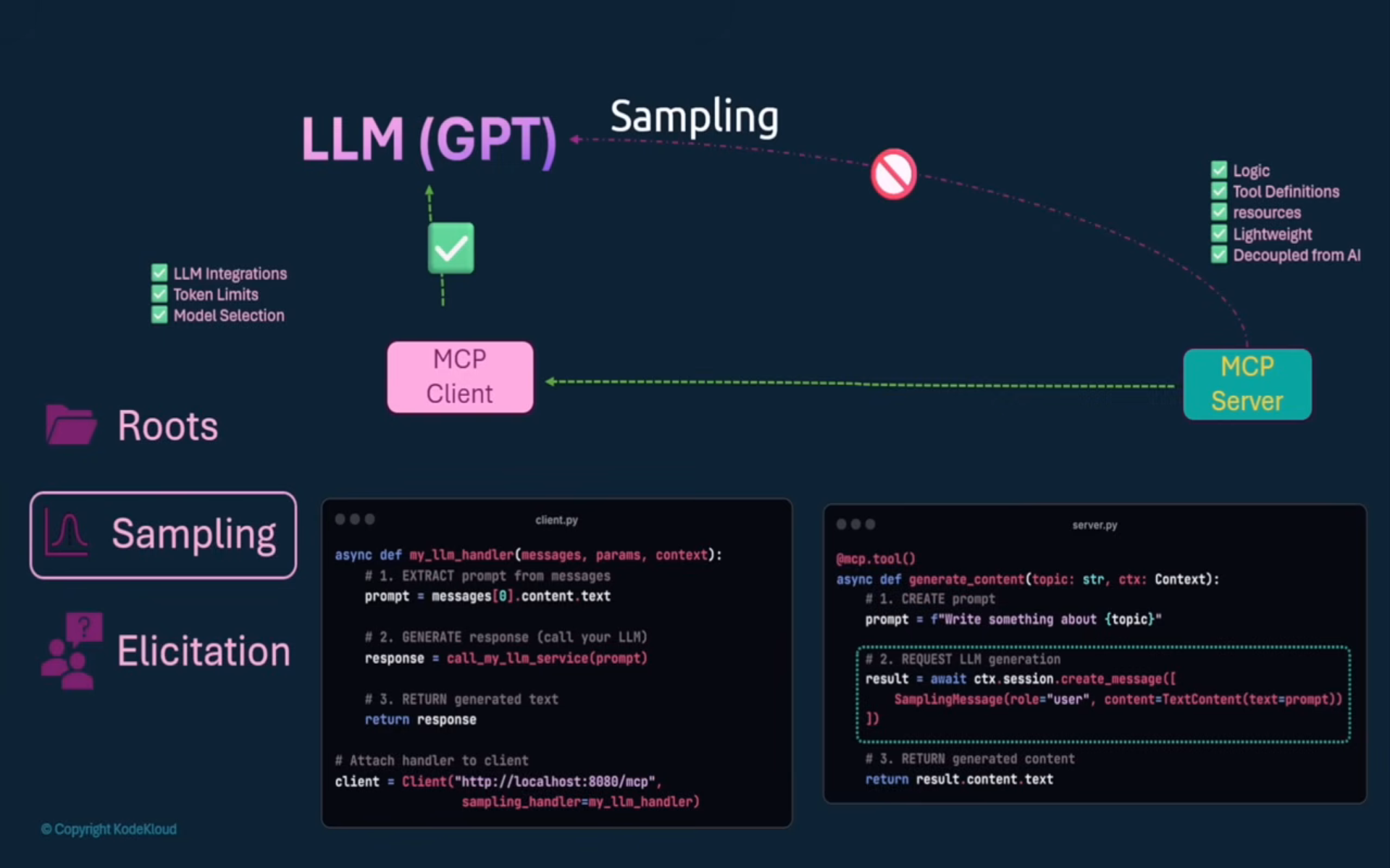
@mcp.tool()
async def summarize_document(text: str, ctx: Context) -> str:
    result = await ctx.session.create_message(
        messages=[{"role": "user", "content": f"Summarize:\n\n{text}"}],
        max_tokens=300,
    )
    return result.content
Why the round trip instead of the server calling a model API directly? Cost and trust stay with the client. The client knows which model the user has consented to use, is paying for, or has rate-limited - the server just asks for a completion and the client decides how (or whether) to fulfill it.
Elicitation: servers asking the user for structured input
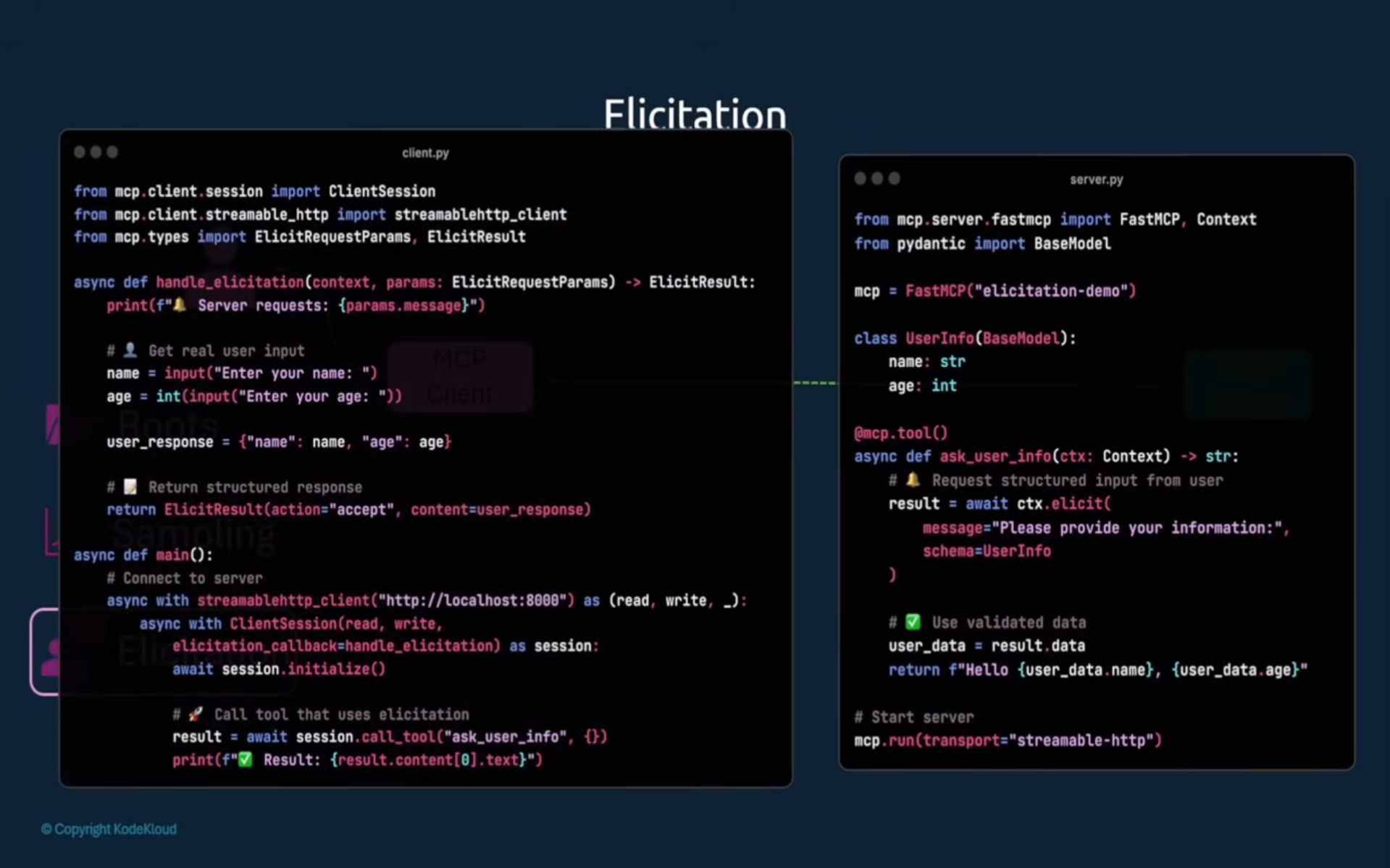
Same pattern as sampling, but aimed at a human: a tool realizes mid-execution that it's missing something only the user can provide, and asks for it through the client - with a schema, not free text.
# server.py
from pydantic import BaseModel

class SeatPreference(BaseModel):
    seat_type: str  # "window" | "aisle" | "middle"
    extra_legroom: bool

@mcp.tool()
async def book_ticket(flight_id: str, ctx: Context) -> str:
    prefs = await ctx.elicitation(
        message="Which seat would you like?",
        schema=SeatPreference,
    )
    return f"Booked {flight_id} - {prefs.seat_type} seat"
# client.py - intercepts the elicitation request; here, just
# prompts the user in a terminal
async def handle_elicitation(request):
    seat_type = input(f"{request.message} (window/aisle/middle): ")
    extra_legroom = input("Extra legroom? (y/n): ").lower() == "y"
    return {"seat_type": seat_type, "extra_legroom": extra_legroom}
Because the schema is a Pydantic model, the client can render a real form (checkboxes, dropdowns) instead of parsing free-text answers, and the server gets back validated, typed data.
Roots vs. Sampling vs. Elicitation - the pattern
All three exist because a server is intentionally sandboxed: no arbitrary filesystem access, no direct model access, no direct user access. Every time a tool needs one of those, it goes back through the client, which acts as the trust boundary and decides how to respond.
| Feature | Server asks the client for... | Client responds with |
|---|---|---|
| Roots | which paths it may operate on | a list of allowed URIs |
| Sampling | an LLM completion | generated text |
| Elicitation | structured info only the user has | validated data matching a schema |
Quick recap
RAG
- Retrieval → Augmentation → Generation. Best for dynamic factual info; fine-tuning is for static voice/style.
- Semantic search (embeddings + vector similarity) beats keyword search (TF-IDF/BM25) on meaning, at the cost of complexity.
- Vector DBs (Chroma, Pinecone) + ANN indexes (HNSW, IVF, LSH) make similarity search fast at scale.
- Chunking is a precision/context tradeoff - fixed-size with overlap, or boundary-aware via LangChain/spaCy.
- Production RAG needs caching, monitoring, graceful failure handling, and a real deployment architecture (e.g. Kubernetes microservices).
- LangChain is a framework for building the RAG pipeline - complementary to, not competing with, MCP.
MCP
- Standardizes how agents call tools, instead of hand-writing per-API glue code.
- Three entities: Tools (model-invoked), Resources (client-invoked), Prompts (user-invoked).
- Transport is JSON-RPC 2.0 over stdio (local) or HTTP (remote/streamable).
FastMCPstands up a server fast; stateful vs. stateless determines whether it can use progress reporting, sampling, or elicitation at all.- Roots, Sampling, and Elicitation are the three ways a sandboxed server reaches back through the client for filesystem access, model access, and user input, respectively.