Learn Cybersecurity
Security isn't a separate skill you bolt on at the end of a project — it's a way of thinking that shapes how you design, write, and review code from the start. This page covers the core mental models and vulnerability classes every developer should know: how to think like an attacker (STRIDE), what the most common web risks are (OWASP), how authentication actually works under the hood, and how to defend against the attacks you're most likely to run into.
Each section below is meant to stand alone as a reference. Skim the tables for a quick refresher, or read the prose for the "why" behind each concept.
Thinking Like an Attacker: STRIDE
STRIDE is a threat-modeling framework. Instead of guessing at what might go wrong, it gives you six categories of questions to ask about any system you build — a login form, an API endpoint, a file upload, anything.
| Letter | Threat | Ask yourself | Example |
|---|---|---|---|
| S | Spoofing | Could someone pretend to be someone else? | Logging in as another user by guessing/stealing their session token |
| T | Tampering | Could someone change data they shouldn't? | Editing a hidden form field to change the price of an item before checkout |
| R | Repudiation | Could someone do something and deny it later? | A user deletes a record and there's no log proving they did it |
| I | Information Disclosure | Could private data leak out? | An error message reveals database schema or internal file paths |
| D | Denial of Service | Could someone stop the app from working? | Flooding a login endpoint with requests until the server falls over |
| E | Elevation of Privilege | Could someone get powers they shouldn't have? | A regular user finds an API route that lets them perform admin actions |
The value of STRIDE is that it's proactive. Before you ship a feature, run through the six letters and ask whether your design opens any of these doors. It's much cheaper to close a hole at design time than after an incident.
The OWASP Top 10
Where STRIDE helps you think about threats, the OWASP Top 10 is a concrete, regularly-updated list of the most common and impactful vulnerabilities found in real web applications. If you only memorize one security list, make it this one.
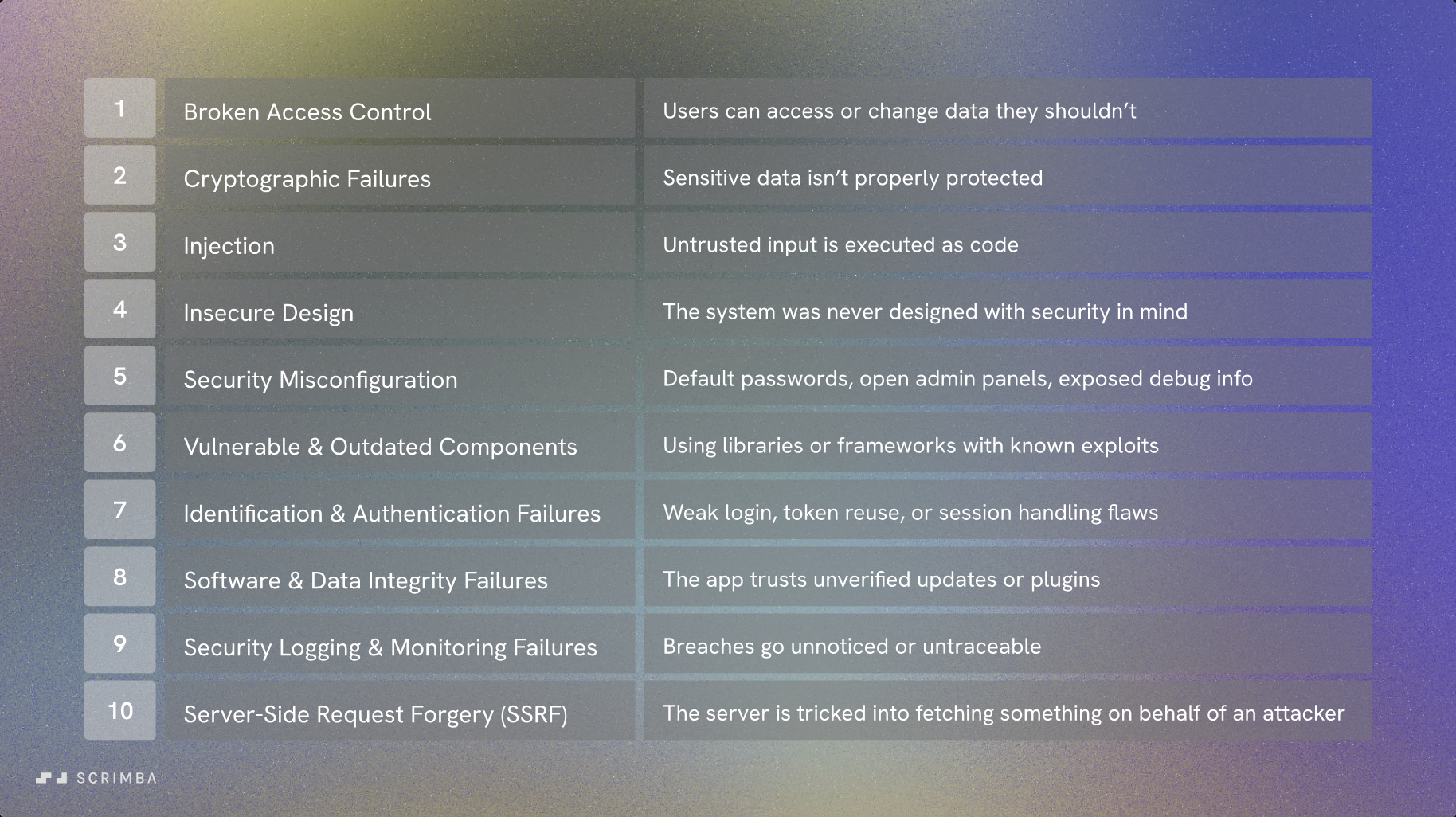
| # | Risk | What it means | How to defend against it |
|---|---|---|---|
| 1 | Broken Access Control | Users can access or change data they shouldn't. | Enforce permission checks on the server for every request, never trust the client. |
| 2 | Cryptographic Failures | Sensitive data isn't properly protected. | Encrypt data in transit (TLS) and at rest; never roll your own crypto. |
| 3 | Injection | Untrusted input is executed as code. | Use parameterized queries and validate/escape all input. |
| 4 | Insecure Design | The system was never designed with security in mind. | Threat model early (see STRIDE above) instead of patching after the fact. |
| 5 | Security Misconfiguration | Default passwords, open admin panels, exposed debug info. | Harden defaults, disable verbose errors in production, review configs regularly. |
| 6 | Vulnerable & Outdated Components | Using libraries or frameworks with known exploits. | Keep dependencies patched; monitor for CVEs (e.g. npm audit). |
| 7 | Identification & Authentication Failures | Weak login, token reuse, or session handling flaws. | Use strong session/token management (see below), rate-limit login attempts. |
| 8 | Software & Data Integrity Failures | The app trusts unverified updates or plugins. | Verify signatures/checksums on anything you install or auto-update. |
| 9 | Security Logging & Monitoring Failures | Breaches go unnoticed or untraceable. | Log security-relevant events and actually monitor/alert on them. |
| 10 | Server-Side Request Forgery (SSRF) | The server is tricked into fetching something on behalf of an attacker. | Validate and allow-list any URLs the server fetches on a user's behalf. |
How Authentication Actually Works
"Authentication" isn't one thing — there are a few different models for proving who a user is on each request, and each comes with different trade-offs.
Stateful sessions vs. opaque bearer tokens
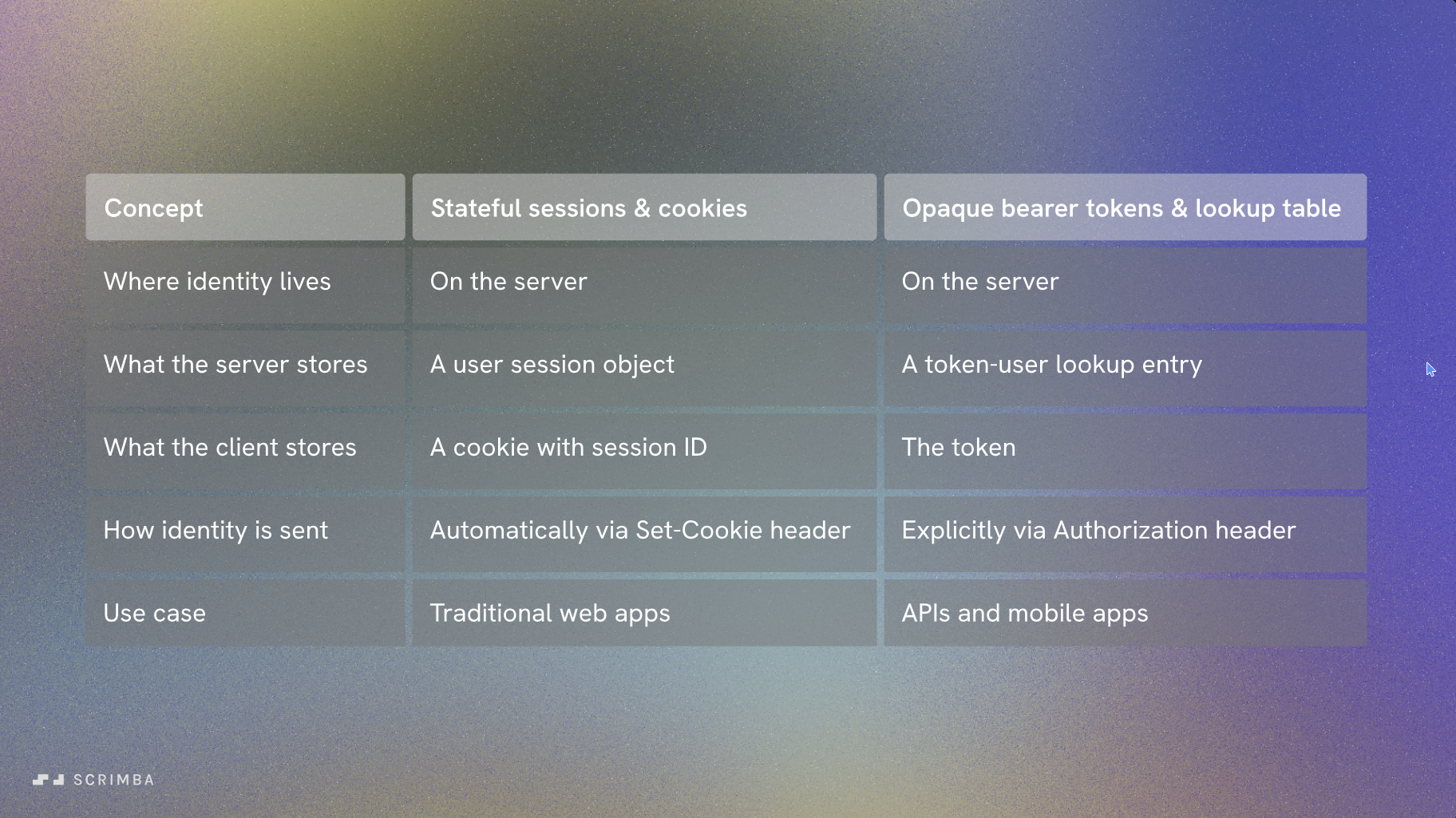
In a stateful session, the server creates a session object when you log in and gives your browser a cookie containing just the session ID. The browser doesn't need to do anything special — the cookie is sent automatically on every request. This is the classic model for traditional server-rendered web apps.
An opaque bearer token looks similar in spirit (the server still keeps a lookup table), but the client has to explicitly attach the token to each request, usually in an Authorization header. This fits APIs and mobile apps better, since there's no browser managing cookies for you.
| Concept | Stateful Sessions & Cookies | Opaque Bearer Tokens |
|---|---|---|
| Where identity lives | Server | Server |
| What the server stores | A user session object | A token → user lookup entry |
| What the client stores | A cookie with the session ID | The token itself |
| How identity is sent | Automatically via Set-Cookie | Explicitly via Authorization header |
| Best fit | Traditional web apps | APIs and mobile apps |
Opaque tokens vs. JWTs
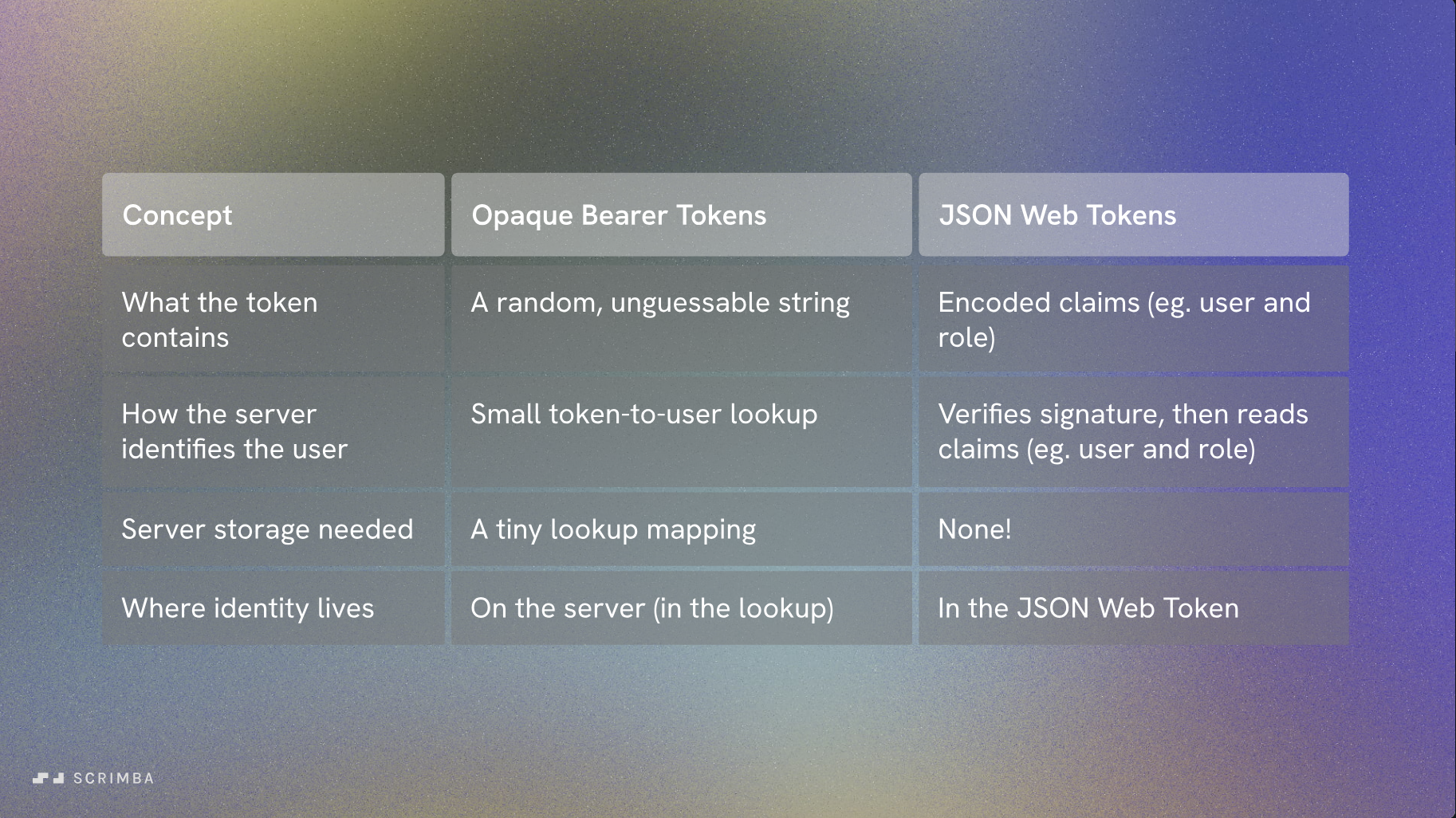
Not all tokens are created equal. An opaque token is just a random string — meaningless on its own, useful only because the server can look it up. A JSON Web Token (JWT) actually contains the user's claims (like their ID and role), cryptographically signed so the server can trust them without a database lookup at all.
| Concept | Opaque Bearer Tokens | JWT |
|---|---|---|
| What the token contains | A random, unguessable string | Encoded claims (user ID, role, etc.) |
| How the server verifies it | Looks it up in a table | Verifies the signature, then reads the claims |
| Server storage needed | A lookup mapping | None |
| Where identity "lives" | On the server (in the lookup) | Inside the token itself |
The catch with JWTs: because the server doesn't check a database on every request, there's no easy way to revoke a JWT before it expires. If a JWT is stolen, it's valid until it naturally expires — which is why short expiration times plus refresh tokens are a common pattern.
Comparing the architectures
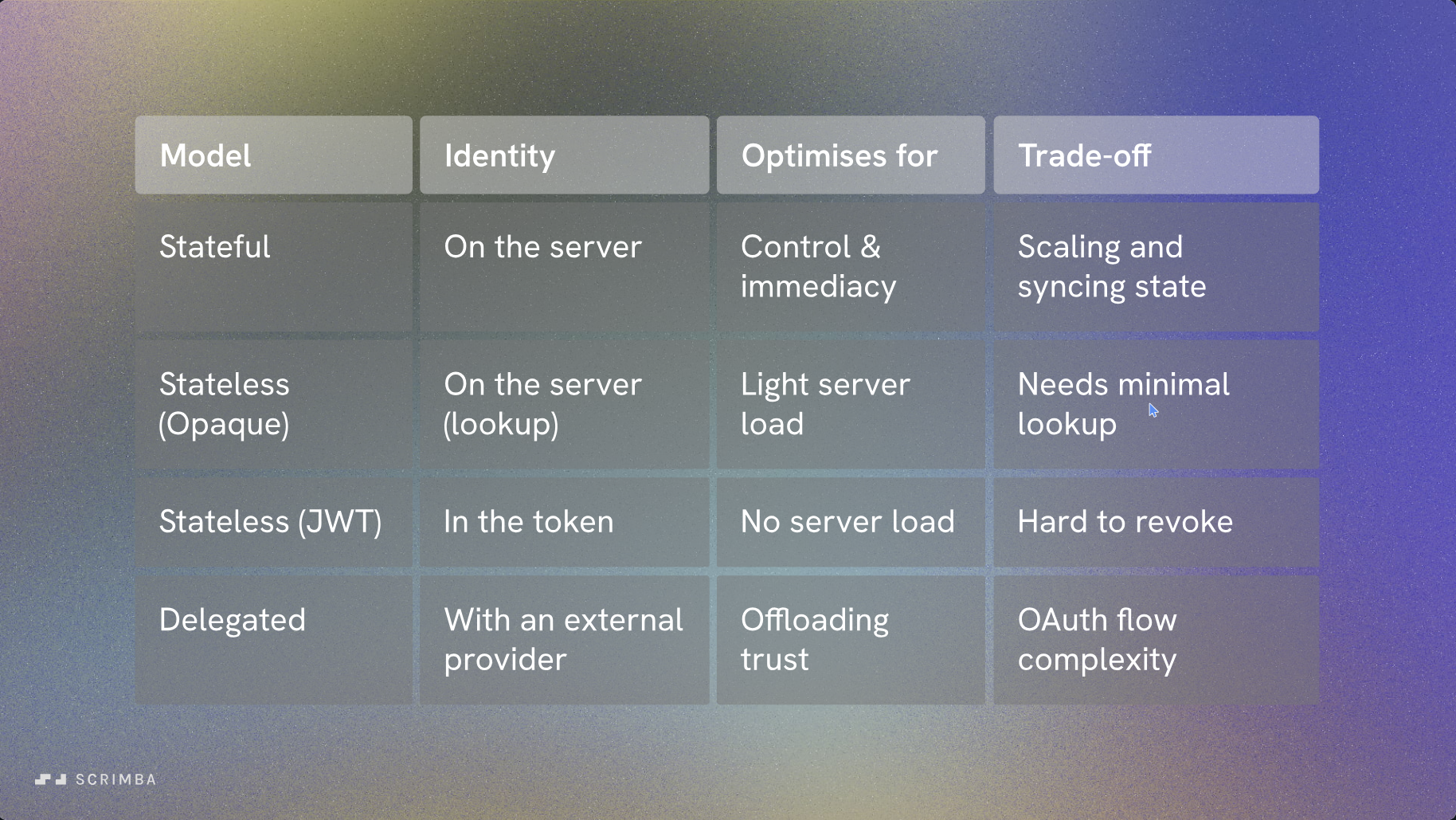
| Model | Identity lives... | Optimizes for | Trade-off |
|---|---|---|---|
| Stateful | On the server | Control & immediacy (instant revocation) | Scaling and syncing session state across servers |
| Stateless (Opaque) | On the server (lookup) | Light server load | Still needs a lookup on every request |
| Stateless (JWT) | In the token | No server-side lookup at all | Hard to revoke before expiry |
| Delegated (OAuth) | With an external provider | Offloading trust to a provider like Google/GitHub | OAuth flow complexity, dependency on a third party |
There's no universally "best" option — the right choice depends on whether you need instant revocation, how many servers you're running, and whether you want to build your own identity system at all versus delegating to an OAuth provider.
OAuth 2.0: Delegated Authorization
OAuth 2.0 solves a different problem than the session/token models above: instead of your app verifying a password, it lets a user grant your app limited access to their data on another service — without ever handing your app their password for that service. It's how "Sign in with Google" or "Connect your GitHub account" buttons work.
The key word is authorization, not authentication. OAuth was designed to answer "can this app do X on my behalf?", not "who is this user?" (that distinction matters — see the OpenID Connect note below).
The four roles
| Role | Who it is | Example |
|---|---|---|
| Resource Owner | The user granting access | You, logging into a third-party app |
| Client | The app requesting access | The third-party app itself |
| Authorization Server | Issues tokens after the user approves | Google's/GitHub's OAuth server |
| Resource Server | Hosts the protected data | Google Drive API, GitHub API |
The Authorization Code flow (the one you'll use most)
This is the standard flow for a server-side web app:
- Your app redirects the user to the authorization server's login/consent screen, including your
client_id, aredirect_uri, and thescope(what permissions you're asking for). - The user logs in (on the authorization server's site, not yours) and approves the requested scopes.
- The authorization server redirects back to your
redirect_uriwith a short-lived authorization code. - Your server exchanges that code — plus your
client_secret— for an access token (and often a refresh token) via a direct server-to-server request. - Your app uses the access token to call the resource server's API on the user's behalf.
The reason step 4 happens server-to-server rather than in the browser: the authorization code alone is useless without the client_secret, so even if it leaks in a browser redirect, an attacker can't complete the exchange.
PKCE: the fix for public clients
Mobile apps and single-page apps can't safely hold a client_secret — anything shipped to the client can be extracted. PKCE (Proof Key for Code Exchange, pronounced "pixy") fixes this: the client generates a random secret (code_verifier) before the flow starts, sends a hashed version (code_challenge) with the initial request, then proves it holds the original secret when exchanging the code for a token. This binds the code exchange to the same client that started the flow, without needing a stored secret at all. PKCE is now recommended for all clients, not just public ones.
Scopes and tokens
- Scopes limit what the access token can do (e.g.
repo:readvsrepo:write) — always request the minimum your app actually needs. - Access tokens are typically short-lived and are what you attach to API calls (see the Opaque vs. JWT comparison above — OAuth access tokens can be either format depending on the provider).
- Refresh tokens are long-lived and stored securely server-side; they're used to get a new access token without asking the user to log in again. A leaked refresh token is far more dangerous than a leaked access token, since it can mint new access indefinitely until revoked.
OAuth vs. OpenID Connect (OIDC)
OAuth alone tells you nothing about who the user is — only that your app was granted some access. OpenID Connect is a thin identity layer built on top of OAuth 2.0 that adds an id_token (a JWT containing the user's identity claims). If you see "Sign in with Google" actually logging you in — not just granting access to your Google data — that's OIDC, not bare OAuth.
Common mistake: using a bare OAuth access token as proof of identity. An access token proves the bearer has some delegated permission; it doesn't prove who that bearer is. Use the OIDC id_token for authentication, and reserve OAuth access tokens for authorization to APIs.
Defending Against Denial-of-Service
A denial-of-service (DoS) attack tries to make a system unavailable to legitimate users — by overwhelming it with traffic, exhausting a resource, or exploiting a slow code path. A distributed denial-of-service (DDoS) attack does the same thing from many sources at once, making it much harder to block by simply banning one IP address.
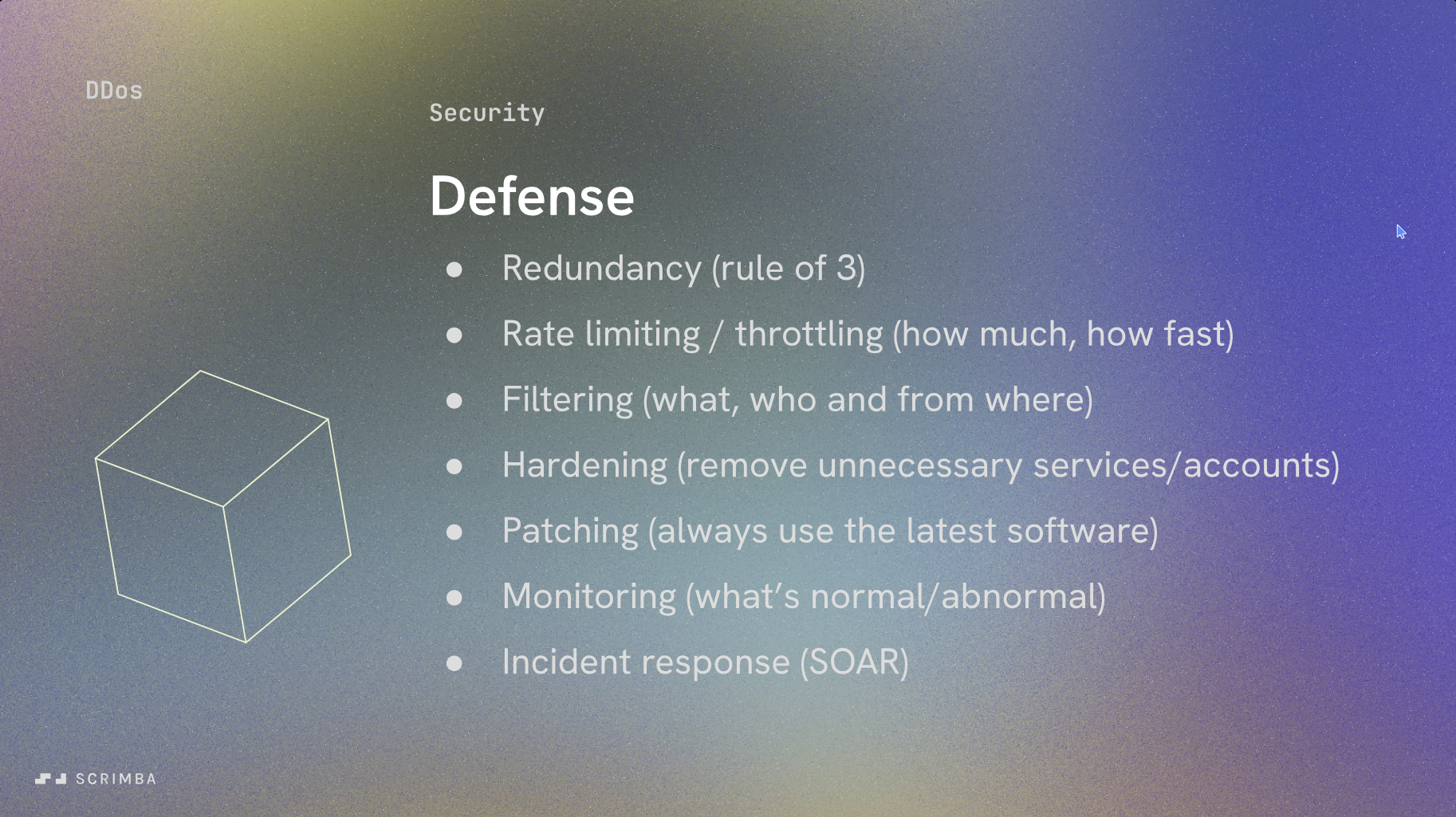
No single defense stops a DDoS attack — it takes layers:
- Redundancy — run multiple instances/regions (the "rule of 3") so no single point of failure takes the whole system down.
- Rate limiting / throttling — cap how much and how fast any one client can hit an endpoint.
- Filtering — decide what traffic, from whom, and from where is allowed in at all (e.g. a WAF or firewall rules).
- Hardening — turn off unnecessary services and accounts so there's less surface area to attack.
- Patching — keep software current, since many DDoS techniques exploit known, fixed bugs.
- Monitoring — know your normal traffic baseline so you can spot an attack starting.
- Incident response — have a plan (often automated via SOAR tooling) for what happens the moment an attack is detected.
A simple first line of defense you can implement yourself is rate limiting on sensitive endpoints (login, password reset, search) — for example, using a middleware like express-rate-limit in a Node.js app to cap requests per IP per minute.
Common Vulnerabilities & How to Prevent Them
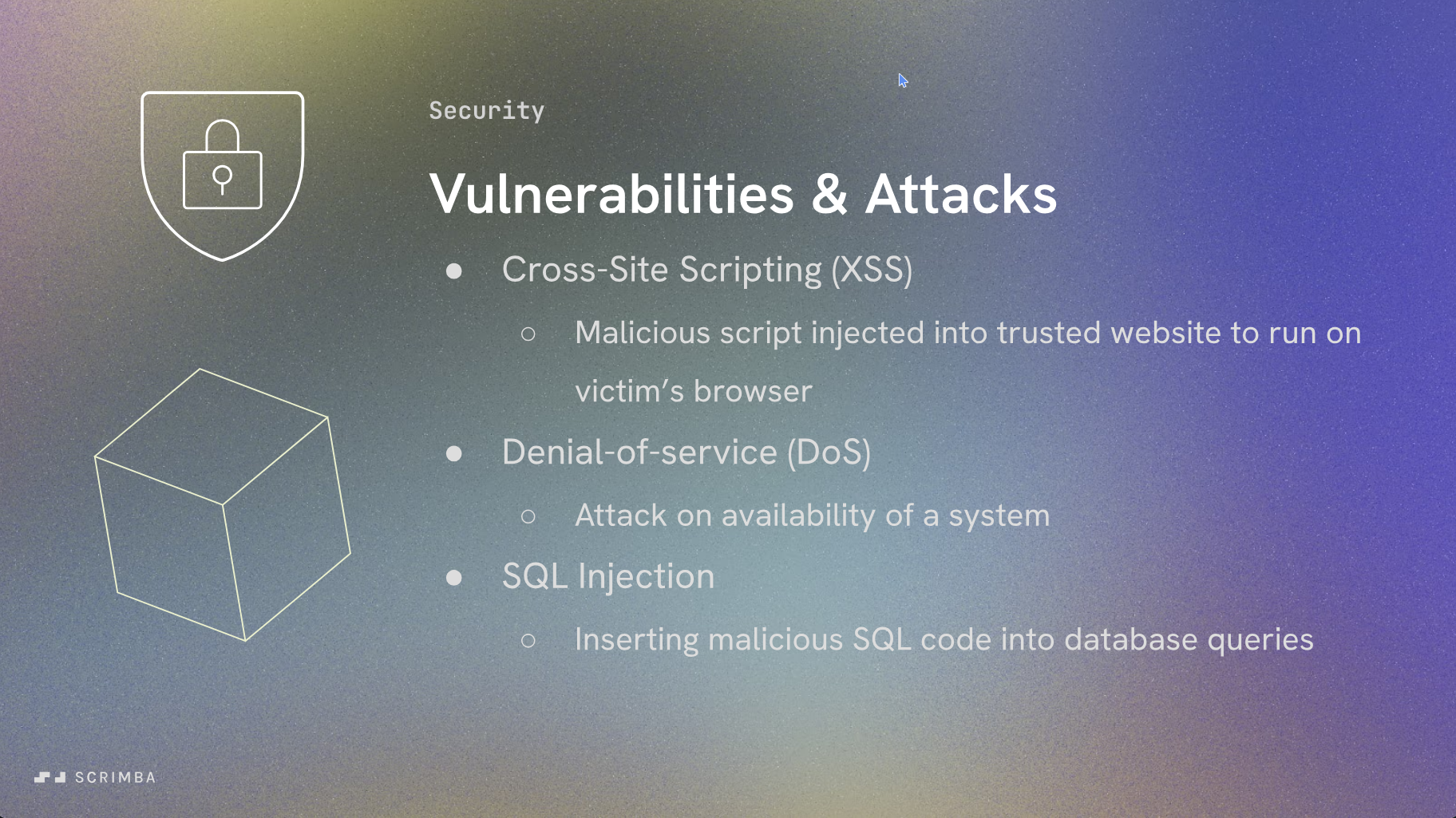
Cross-Site Scripting (XSS)
XSS happens when an attacker gets their own JavaScript to run in another user's browser, usually by injecting it into content your app later renders unescaped — a comment field, a username, a URL parameter.
// Dangerous: renders raw user input as HTML
element.innerHTML = userComment;

// Safer: treat it as text, not markup
element.textContent = userComment;
Defenses: escape/encode any user-supplied content before rendering it as HTML, use a templating engine or framework that escapes by default (React, for instance, escapes strings rendered in JSX automatically), and set a Content-Security-Policy header to restrict which scripts can run at all.
SQL Injection
SQL injection happens when user input is concatenated directly into a database query, letting an attacker rewrite the query's logic.
// Dangerous: attacker input becomes part of the query itself
const query = `SELECT * FROM users WHERE email = '${email}'`;

// Safer: parameterized query — input is always treated as data, never code
const query = 'SELECT * FROM users WHERE email = ?';
db.execute(query, [email]);
Defenses: always use parameterized queries or an ORM that does this for you, validate input shape and type (a library like Zod is great for this in Node.js), and apply the principle of least privilege to your database user so even a successful injection can't do much damage.
Denial-of-Service (DoS)
As covered above — an attack on availability rather than confidentiality or integrity. Beyond network-level DDoS, DoS can also come from within your own code: an unbounded loop, an unindexed database query that gets slower as data grows, or an endpoint that lets a user trigger an expensive operation with no rate limit.
Defenses: rate limit and validate input size/complexity, set timeouts on external calls, and load-test endpoints that do expensive work.
Where to Go From Here
Security is a practice, not a checklist you complete once. A good habit: every time you build a new feature, spend five minutes running it through STRIDE, and check whether it touches any of the OWASP Top 10 categories above. Most real-world breaches come from missing one of these fundamentals — not from some exotic zero-day.